Someone locked out does not read a locksmith website; they scan it. Within seconds they are trying to answer two questions: is this a real business, and will the price change once the van arrives. If the first screen does not answer both, the visitor goes back and taps the next number, however polished the design.
This guide walks through the decisions we make when building a website for a locksmith, in the order an owner meets them: gathering proof, writing about charges, explaining ID checks, building car key pages, setting out your coverage at night and measuring what brings work. Each section ends in something you can check on your own site today.
01The five things a caller checks in the first minute
A stressed visitor's eyes stop at five points, and all five belong on the first screen or within one scroll. Knowing the order tells you what stays on the home page and what moves to inner pages.
- A call button: Fixed at the bottom of the screen where the thumb rests, showing the number as text as well.
- A name and a face: The locksmith who will actually turn up, with a real photo, not an anonymous "our team".
- An address: Your shop address, or if you work from a van, a plain line naming the areas you cover.
- A sentence about charges: One clear line saying the price is agreed before work starts, linking to the detail.
- Hours right now: Whether you can be reached at this moment, plus the hours of any night line.
Try this test: hand your phone to a friend, let them open your site and lock the screen after five seconds. Then ask them the locksmith's name, when the price is agreed and how to call you. If they miss one of the three, the first screen needs rework. We repeat this test on every draft, because a large hero image pushes these five points down faster than anything else.
02Real proof, credentials and insurance, shown honestly
The only reliable way to stand apart from rogue listings is evidence that is hard to fake, so we plan a photo and document day before any design work. Stock images never answer the question a wary visitor is really asking: who is behind this site.
- The shop front and sign, shot from the street; without a shop, your van with name and number visible.
- A portrait of each locksmith in workwear, face clearly visible, with a one line introduction and their name.
- A few frames from real jobs, such as a cylinder change or a uPVC mechanism repair, with no house number or street in view.
- Copies of every certificate, membership and insurance document we will mention, so nothing on the site rests on memory.
Credentials build trust only when they are accurate. In the UK there is no government licensing of locksmiths; the Master Locksmiths Association runs a voluntary approval scheme with criminal record checks, an exam and regular inspections, which is why customers look for it. Where your state or country does license locksmiths, the license number belongs on the site.
- Membership logos: Shown only when current, with a reference to your entry so a customer can confirm it.
- Insurance: The type of cover you hold, in plain words, because customers want to know damage would be handled.
- Training: Courses or manufacturer training you have actually completed, with the year.
When the same person appears under the same name on the site, on your Google Business Profile and on the van, the customer at the door can think, "that is the person I saw online."
03Writing the charges section item by item
The charges section is not there to quote a figure; its job is to explain what a price is made of and when the customer hears it. Someone who has heard of quotes that tripled at the door will assume a locksmith who never mentions money is part of that story.
We build the section around these items:
- Call out: Whether travel affects the charge and which areas count as standard.
- Time of day: If nights, weekends or public holidays add an item, from which hour it applies.
- Parts: That cylinders, locks or transponder keys are added separately and the customer chooses between options.
- Type of job: Why a door that is only closed differs from a locked one, and why a uPVC multipoint lock takes longer than a simple night latch.
We close with one commitment: the price is given on the phone with its scope, confirmed at the door after a look at the lock, and no work starts until the customer agrees. Whether you publish actual amounts is your decision; every sentence on the page has to match what you do on the doorstep. We avoid phrases like "from only", which signal a figure that will grow.
04Making the phone call match the website
The website starts the trust and the phone call completes it; if the two say different things, the trust built online is gone in thirty seconds. So while writing copy we also listen to how the business answers the phone and shape the site around that conversation.
For whoever answers, we suggest a short call flow that mirrors the site:
- Give the business name and your own name; the caller wants to hear the name they just saw.
- Ask about the situation: door, car or safe; slammed shut or deadlocked; broken key in the cylinder.
- Confirm the location and give an estimated arrival time, adding that it depends on traffic.
- Explain the charge items in the same order as the website and give the total with its scope.
- Mention the ID check in advance and ask for a location pin on WhatsApp.
On the website, that flow is backed by the charges page, the ID check page and the area pages. Being able to say "just as it says on our website" closes the doubt with a second piece of evidence. If several people answer the phone, keep these five steps written down in the shop or the van.
It works the other way too. We ask you to note the questions callers ask most for one week; those notes become the question and answer blocks on service pages, so the site starts answering in advance what you used to repeat on every call.
05What the ID and ownership check page should say
The ID check page should never make the customer feel suspected; it should tell them they are dealing with a locksmith who will not open someone else's door. We write it in an explanatory rather than accusing tone and split it by the situations you meet most often.
- Homeowner: Photo ID plus something linking them to the address; what counts is written according to your practice.
- Tenant: A tenancy agreement or proof of address, and if needed a call to the landlord or managing agent.
- Documents inside: What you do when proof is locked in, such as checking it once the door is open or a neighbor confirming.
- Vehicle: Proof of ownership or registration and ID; if those are inside the car, they are checked once it is open.
- Safes and business premises: The authorized person's ID and, where needed, written approval from the company.
We base the accepted documents on your own procedures and on any guidance from your trade association, never on generic text copied from another site. The page ends with one sentence of reasoning: this check is what keeps your own door from being opened for a stranger tomorrow. That line turns the check from an obstacle into a service.
The same message appears briefly on the lockout and car key pages and in the automatic WhatsApp reply. When customers see it in three places, they expect the request at the door.
06Lockouts, lock changes and safes: one page per job
A separate page earns its place by answering a separate question; what a locked out caller wants to know has little in common with what a homeowner upgrading a lock wants to know. We build each service page around the three or four questions in that customer's head.
- Lockouts: Is the door slammed or deadlocked, can it always be opened without damage, and what changes if not.
- Lock changes: After moving in or losing a key, is a new cylinder enough or does the whole lock need replacing.
- uPVC doors: Which multipoint mechanisms you repair, whether common parts are in stock, how long the job usually takes.
- Broken key extraction: What the customer should avoid doing while the key is stuck in the cylinder.
- Safe opening: Proof of authority and booked appointments; this page follows the planned route, not the emergency one.
Honesty sells better than bold claims here. Instead of "we open any door without damage", a paragraph explaining when a lock may have to be replaced prevents disappointment on the doorstep. Every page ends with the same call button and a short link to the charges page, and there is no page at all for jobs you do not take on.
07Car key pages and the pre visit form
Car key customers are in a hurry too, but they ask more questions than someone locked out of a home, so we build the auto side as its own cluster. Make and model pages exist only for vehicles you really work on, and each says plainly what you can do for that make.
The pre visit form is designed to replace five minutes of questions on the phone:
- Make, model and year, chosen from a list so nothing is misspelled.
- The need: all keys lost, a spare key, a faulty remote or a car locked with the key inside.
- A photo of any remaining key or fob.
- Where the car is, and whether it can be brought to the shop.
- A short note that proof of ownership and ID will be checked before work starts.
The photo field opens the phone camera directly, and the whole form should take under a minute. After sending, a screen tells the customer when you will reply. For those who prefer WhatsApp we add a link with a prepared message, which you can build yourself with our WhatsApp link generator. Terms like transponder, remote and immobilizer are explained in one line each, because customers mix them up and search with all of them.
08Planned work: lock upgrades and survey requests
Upgrading locks, changing cylinders after a tenant leaves or fitting new locks to a shared entrance are not emergencies, and the decision works differently. This customer compares, reads and asks for a visit, so the site should offer information and a booking route rather than just a call button.
- Situation pages: Short guides that start with the customer's own words, such as "I just moved in" or "my keys were stolen".
- Product comparisons: Which cylinders and locks you sell suit which doors, described by features rather than prices.
- Survey form: Door type, a photo of the lock and preferred days, so planned work never blocks the emergency line.
- Bulk requests: A separate form for landlords, letting agents and building managers changing locks on several units.
If you also fit smart locks and keyless entry, we add a product section that matches the structure on our smart home installer page. When a survey request arrives, a reply template tells the customer which day and time window to expect. Planned jobs are often more profitable and easier to schedule, so for a locksmith who wants fewer night calls this part of the site can matter most.
09Showing your coverage area and night hours honestly
Area pages help only when each one carries information that is genuinely specific to that area; pages that differ only by the district name tire both readers and search engines. What makes an area page worth reading is detail that only you know.
- Arrival: Where you set out from for that area and when travel times grow, without promising minutes.
- Housing stock: Real observations, such as older terraces with mortice locks or new apartment blocks with fob entry.
- Night coverage: Whether you go there after dark and which line is open.
- Local contact: The locksmith who usually covers the area and regular work for local managing agents.
On your Google Business Profile, the business name must match your real world name, with no area or service keywords added. A mobile locksmith without a shop can hide the address and set a service area instead; showing an address where you have no premises breaks the guidelines and the trust. Keep night line hours identical on the site and the profile, so nobody calling at two in the morning reaches a closed number.
10Speed for a phone in a dark stairwell
A locksmith website is often opened on a weak signal with a low battery, so speed here decides whether the call happens at all. Google's Core Web Vitals put numbers on that experience.
- LCP: Measures how long the main content takes to appear; good is 2.5 seconds or less.
- INP: Measures how quickly the page responds when someone taps; good is 200 milliseconds or less.
- CLS: Measures how much content shifts while loading; good is 0.1 or less. If the call button jumps, the thumb lands in the wrong place.
In practice we set the number as text rather than an image, load the call button first and push large images further down. Chat bubbles, popups and autoplay videos stay off emergency pages; they slow the page and cover the button. You can see how your current site behaves with our mobile friendly test in a few minutes; bring the result to a call and we will set priorities around it. After launch we repeat the measurement whenever new photos, area pages or scripts are added.
11Reviews, ads and search visibility
Visibility for locksmith searches rests on three legs: service and area pages, your Google Business Profile and the reviews on it. Ads do not replace any of them; spending on a weak site only sends more people away with the same doubts.
- Send the review link on WhatsApp once a job is done; a code on the card you leave behind, made with our QR code generator, works too.
- Ask customers to describe the job and their area in their own words, never hand them a script.
- Reply calmly and specifically to every review, including negative ones, without naming addresses or lock models.
- Never buy reviews or ask friends to post in bulk; careful readers notice, and platforms remove them.
Check the rules before any campaign. Google Ads policy requires locksmiths advertising in the United States and Canada to complete advanced verification, and in some European countries locksmith ads cannot run at all. Where ads are allowed, a landing page for a single job can go live without disturbing the main site, while our SEO service plans area and service pages together.
12Measuring calls and protecting location data
Measurement is about seeing which page, which area and which hour bring work, not counting visits; on a locksmith website that data also includes personal information, so it has to be collected with care. We set up both sides together.
- Call button: Which page and which hour it was tapped on, and which areas night calls come from.
- WhatsApp: Chats started are tracked separately; messages with a location and a photo are often the most serious requests.
- Forms: The car key form and the survey form are tracked as separate conversions.
- Missed demand: The same person calling several times in a short span can point to a busy or closed line.
Because the forms collect addresses, locations, vehicle details and sometimes ID, a clear privacy notice sits next to each form, and we decide upfront how long photos and locations are kept and who can see them. Where you serve visitors in the European Economic Area, Google's consent mode and a cookie banner are part of the setup. In the first week we place test calls and forms with your team, and no report is handed over until each conversion lands on the right page and channel.
13Common mistakes on locksmith websites
Most of these mistakes are made with good intentions, yet each one sends the call to another number. We have written the better alternative next to each, so you can review your current site in five minutes.
- Claiming to be local everywhere: List the areas you really cover and name the ones you serve at night.
- Promising arrival in minutes: Explain what arrival depends on and give an estimate on the phone instead.
- Using stock photos of locksmiths: Show the real person who will turn up, with a name; customers will compare.
- Staying silent about charges: Even without figures, set out the items and say the price is agreed before work starts.
- Putting the number in an image: Use text and a click to call button, so screen readers can read it as well.
- Hiding the ID check: Present it in advance as part of the service, not as a surprise at the door.
We run this list against every locksmith page before it goes live, and a page that fails any point is fixed first, because in an emergency there is rarely a second chance. Once a year, open every page on your own phone and confirm charges, hours and staff details are still current.
14Questions to ask an agency, and your next step
When choosing an agency for a locksmith website, ask whether they separate emergency calls from planned work and how they approach the charges section before you look at design samples. If those two are wrong, even an elegant site will not bring the calls you expect.
- Which part of the page loads together with the call button, and how do you test it on a weak connection.
- Who writes the charges and ID check copy, and how will you learn my actual procedures.
- What will you need from me so area pages are not copies of each other.
- Will calls, WhatsApp chats and forms be tracked separately, and will I be able to read the report myself.
- How do we add an area or a service after launch.
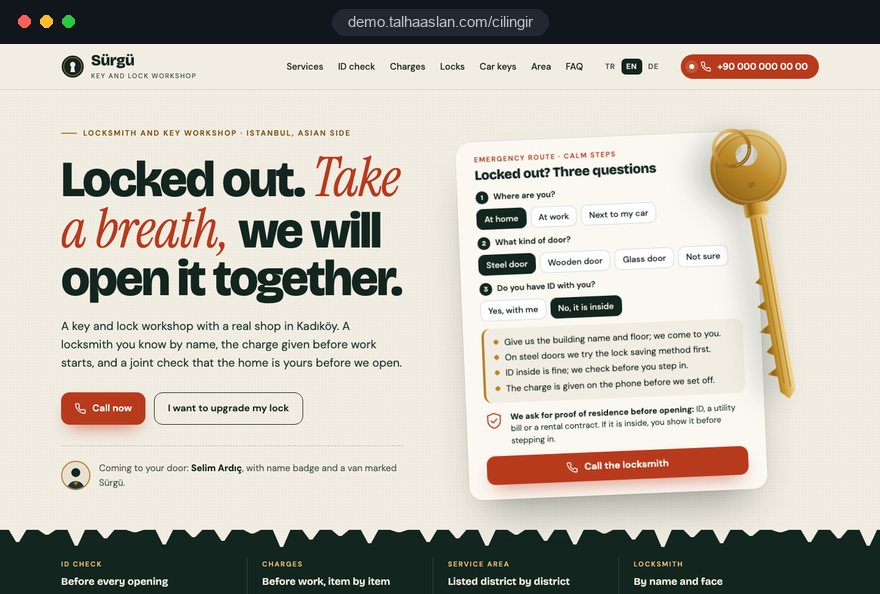
We do not have a live client project in this field yet, so we show our approach on a live demo site linked on this page. You can see delivered work from other sectors on our references page and read how we work in our web design service. Fixed price packages are in the web design pricing section; send us your jobs and coverage area through our contact page, and we will map out the page structure and a written quote for your business.