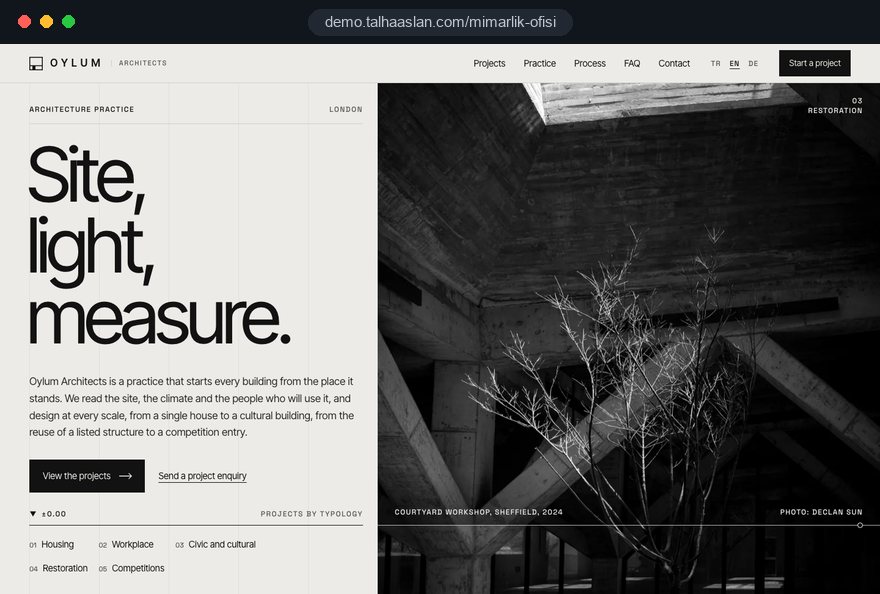
An architecture firm website carries a decision that a stranger makes in the first few minutes: has this practice worked at my scale and on my building type, who has it worked with, and how do I reach the right person. Clients, developers, competition juries, editors and graduates looking for a job all arrive with different questions, and a well built site gives each of them a short path to an answer.
In this guide, we at Talha Aslan and team walk through the decisions we make, in order, when we build a site for an architecture firm: choosing the portfolio, structuring project pages, preparing images, presenting titles and registration, designing the enquiry form, earning search visibility and keeping the site current.
01Build the project inventory before any design
The structure of the site comes from the projects you actually have, not from a design idea, so the first task is to put every project into one spreadsheet. Within a few hours it shows which building types are well represented, which projects lack good images and which ones are missing credits.
We suggest one row per project with these columns:
- Basics: Project name, location, year, floor area and status (design, on site, completed).
- Image status: Professional photography, renders only, or drawings that can be shared.
- Rights: The photographer or visualization studio and whether web use is agreed in writing.
- Client consent: Whether the client can be named and how precisely the location can be shown.
- Strategic value: Whether the project represents the kind of commission you want next.
The last column causes the most debate. Early residential extensions may matter to the founders, but if the practice now targets schools or mixed use schemes, that work belongs in the archive rather than the front window. Scoring the inventory with the partners settles which ten or fifteen projects go on the home page, and it produces a to do list of missing photography and credits that can run in parallel with design.
02Set up building type and status filters
Good filters take a visitor to their building type in two clicks; badly planned filters split the portfolio into near empty categories. The rule is simple: if a category does not hold at least three strong projects, do not open it yet, and group the work under a broader heading.
We think about filters along three axes:
- Building type: Housing, workplace, civic and cultural, education, healthcare, conservation, named the way clients search, not the way the studio talks.
- Status: In design, on site, completed, plus the result for competition entries.
- Scale: A rough split into small, medium and large, or sorting by floor area, because clients compare your experience with the size of their own project.
An internal term like "collective living" may mean something precise to you, while a developer searches for "multi family housing" or "residential architect". A project can appear under several types, but each needs one primary type so that its title and internal links stay consistent.
Studios whose work is mostly interiors need a different structure, where furniture, materials and finished rooms lead. In that case the setup on our interior designer website page is likely a closer fit.
03Balance credits and narrative on project pages
A project page serves two readers: the client who scans the credits to judge your capacity, and the juror or editor who wants to understand the idea. So the page needs a scannable credits block at the top and a short, structured narrative below it.
The credits list location, year, floor area, client, status, project team, collaborators and photo credit. For the narrative we recommend this order:
- Context: Site, surroundings, brief and the client's ambition in two or three sentences.
- Key move: The idea that drove the design and why it was the right answer.
- Making: Structure, facade or material decisions worth explaining.
- Use: How the building works today, with a link to any related award entry.
Together these four parts can stay between 250 and 500 words; much longer texts are rarely read to the end. Images sit next to the paragraph they illustrate: the facade detail beside the facade decision, a simplified plan beside the planning idea.
End each page with links to two or three projects of the same type to keep visitors in the portfolio. Build the credit fields as a fixed template from day one, so every new project is entered the same way and the filters draw on the same data.
04Prepare photos and renders for the web
Image preparation decides both the quality and the speed of the site, and unless it becomes a written routine it breaks again with every new project. A file straight from the camera or the rendering software should never go onto the site as it is.
This is the sequence we follow on our projects:
- Select: Choose 8 to 15 strong frames per project including the cover, and drop near duplicate angles.
- Crop: Crop all cover images to one aspect ratio so that grids line up across the site.
- Resize: Produce versions at several widths for phones, tablets, laptops and large screens.
- Convert: Save the versions as WebP or AVIF and set quality by comparing results by eye.
- Name: Give each file a name that describes the project and the view, and write short alt text that describes the image.
Compression has a threshold: stop when board marked concrete, timber grain or an evening sky starts to break up. To see how much your current files shrink in each format, try a few of them in our image converter.
Whoever adds projects after launch needs the same routine, so we hand over a short written guide. Resizing and conversion happen automatically in the content panel; selection, cropping and naming remain decisions for the office.
05Hit Core Web Vitals targets with large images
An image heavy site is fast when the first large image loads with priority, the rest wait their turn and nothing jumps while the page loads. Google measures this with Core Web Vitals: LCP is the time until the largest element on screen has loaded, and 2.5 seconds or less counts as good; CLS measures how much the layout shifts, with 0.1 or less as the target.
The third metric, INP, measures how quickly the page responds to taps and clicks, and 200 milliseconds or less is good; heavy galleries and filters push it up. These are the elements that most often hurt architecture sites:
- Full screen opening slideshow: Five or six large images load at once; only the first should load with priority.
- Autoplay video: A heavy file on a phone; use a poster image and play the video on tap.
- Custom typefaces: Late loading fonts shift text; keep font files few and check that the license covers web use.
- Heavy lightbox plugins: The code for the full screen viewer should load when someone taps an image, not with the page.
Declaring the width and height ratio of every image solves most layout shift problems. Test on a midrange phone over a mobile connection, not on the studio's desktop, because project links are often opened from a message.
06Handle confidential projects, drawings and client consent
Not every project can be published in full, so decide on publication rules up front for private houses, work under confidentiality agreements and competitions whose results are pending.
Common situations and the approach we suggest:
- Private house: Show the district or town instead of the address, and remove family photos and personal items from interior shots.
- Confidential commission: Describe it generically, for example "corporate headquarters, London", without the client name, or leave it out.
- Competition entry: Competition rules may restrict publication until results are announced, so check them before posting.
- Drawings: Publish simplified plans, sections and diagrams rather than detailed construction drawings.
Some practices want certain projects visible only to clients who receive a direct link, and blocking those pages in robots.txt does not work: Google cannot read a noindex tag on a page it is not allowed to crawl, and a URL shared elsewhere can still appear in results.
To keep a page out of search results, leave it crawlable and add noindex. For work that must stay genuinely private, password protection is the only safe option.
07Run awards, publications and press as an archive
Awards and publications show that independent people have judged the practice's work, so they belong in an archive where every entry can be checked, not in a row of logos. Each entry should make sense on its own and link to the project it concerns.
We use these fields for every archive entry:
- Name and organizer: The full name of the award or competition and the body that runs it.
- Year and result: Winner, commendation, shortlist or entry, stated exactly as it was.
- Project link: The entry links to the project page and the project page links back.
- Source: Magazine, book or website, the issue or date, and a link where possible.
A press page answers a separate need. Editors want high resolution images, credits and a short practice description in one place, and a dedicated page with a press contact email address covers it. Confirm that every image in the pack is cleared for press use, and place the credit line next to each image as copyable text.
The preview that appears when a project link is shared on social media or in a message is part of the same shop window. Give every project page the right cover image and title, then check the result with our link preview checker.
08Get titles, registration and team details right
The team page builds trust, but it also carries statements with legal weight: in the UK, section 20 of the Architects Act 1997 reserves practising or carrying on business under a name, style or title containing the word architect for people on the register, with narrow exceptions such as landscape architect. So treat the team page as a checked record, not as marketing copy.
Our checklist for the team and practice pages:
- Titles: Call someone an architect only if they are on the ARB register; use "architectural designer" or "architectural assistant" where that is accurate.
- Practice name: Make sure the firm name and the strapline match the registration of the people behind them.
- Roles: Founder, partner, associate and project lead reflect real responsibility in the office.
- Former staff: Remove them from the team page but keep their contribution in project credits.
Registered architects are bound by the ARB Architects Code, and your professional body may set its own rules for how you present the practice, so have those checked by the office. For a practice outside the UK, check the equivalent rules of your national register.
In the approach text, replace general claims with specifics: which work stages you cover, from concept and planning to technical design and site, which scales you take on and how you work with consultants. Clients then arrive at the first meeting already prepared.
09Design the enquiry form around the first call
A good enquiry form for an architecture practice is a short pre meeting that turns a message into a lead you can assess; its job is not to collect everything but to let you ask the right questions on the first call. A long technical form loses clients, while a one line message box leaves the subject unclear.
Fields we suggest:
- Project type: Options such as house, residential development, commercial, civic, conservation or interiors.
- Location: Town or district; the exact site address can wait for the first conversation.
- Approximate scale: A rough floor area or number of storeys.
- Timing and stage: Whether the site is secured, whether planning has started and when the client wants to begin.
- Contact preference: Phone or email and suitable times.
We recommend leaving file uploads out of the form; title documents, drawings and photos are requested through a secure channel after the first call. A link to the privacy notice sits next to the form and explains why the personal data is collected and how long it is kept.
Put job and internship applications on a separate careers page. Portfolios are large files, so asking for a sharing link instead of an upload protects both the server and your inbox.
10Be found by practice name, project name and building type
An architecture firm is found in three ways: by its name, by the name of one of its projects and through building type searches such as "school architect Manchester"; the site structure has to serve all three separately.
The steps, in order:
- Project page titles: Project name, building type and town appear together in the title.
- Building type pages: Every filter page gets an introduction of two or three paragraphs about the practice's experience with that type.
- Structured data: Practice details and project credits are marked up so search engines can read them.
- Google Business Profile: The business name matches the real practice name exactly, with no added keywords; category and opening hours stay current.
- Image search: Descriptive file names and alt text help projects show up in image results.
We do not promise rankings; nobody can do that honestly. But any content work without this base stays weak.
For a wider search strategy with competitor analysis and a content plan, see our SEO services.
11Plan languages for international competitions and clients
If the practice enters international competitions, works for clients abroad or is published in other countries, a second language is a structural decision to make at the start, not an add on. Languages added later usually stay half done: the home page is translated and the project pages are not.
What we look at when planning languages:
- Separate URLs: Each language has its own address; a button that swaps text on the same address is not enough.
- hreflang: Every language version references the others and itself; without reciprocal annotations Google may ignore them.
- Credit terms: Terms such as gross internal area or work stage names are rendered in the professional language of the target country.
- Selective translation: Start with the projects that matter to international clients instead of translating everything.
We do not leave project texts to machine translation; we review architectural terms with you, because a juror reads a wrong term as carelessness. Units and dates are part of the decision too: square meters or square feet, and date formats, must be consistent within each language.
For clients abroad, a short note on the countries where you can work and how you collaborate with local architects builds confidence. The technical side is covered on our multilingual website page.
12Keep the site current and measure enquiries
An architecture firm website earns its keep not on launch day but two years later, when it is still current; that requires deciding who updates it, when and with which template. The pattern we see most often is a portfolio whose newest project was added years ago.
The routine we suggest:
- Owner: One person in the office adds projects and awards, with a named deputy.
- Triggers: Every completed photo shoot, competition result and publication goes on the site within the same month.
- Annual review: Team page, registration details, featured projects and contact details are checked once a year.
On the measurement side, form submissions, calls and email clicks are tracked as conversions with consent; for visitors in the European Economic Area, Google requires consent mode for measurement and personalized advertising features. You then see which project pages and building types bring enquiries.
If visitors from conservation projects fill in the form more often, adding projects and text to that type is a sensible next step. A short monthly report answering three questions is enough for most practices: which pages were visited most, which pages produced enquiries, and how many enquiries matched the work you want.
13Common mistakes on architecture firm websites
Most of the mistakes we see come from treating the site as a brochure that is made once and then left alone. Each item below pairs the mistake with a better alternative:
- A logo and full screen video as the home page: Clients leave before they know what you do; put three featured projects and a one sentence description of the practice on the first screen.
- Every project given equal weight: Strong work gets lost among weak images; lead with selected projects and move the rest to an archive.
- Only renders for completed buildings: Clients want to see the real building; budget for professional photography on completion and keep renders for projects in design.
- Text baked into images: A project name written over a photo can be read neither by search engines nor by screen readers; put it on the page as text.
- A portfolio only as a PDF: A large PDF opens slowly on a phone and hides individual projects; give each project its own page and send the PDF to clients who ask for it.
- Thin, small, pale gray type: Minimalism that makes text unreadable is a contrast problem; treat sufficient contrast and a readable type size as part of the design.
14Choose a web partner and take the next step
The quickest way to choose a partner is to ask concrete questions about how they would build an architecture firm website; if the answers address your portfolio rather than a generic pitch, you are on the right track. We suggest asking every agency you talk to:
- Images: Who prepares images, in which formats and sizes, and is that automated for new projects?
- Panel: Can credit fields and filters be edited in the panel, or does a new building type need a developer?
- Speed: Will Core Web Vitals be measured on a phone before launch and shared with you?
- Ownership: In whose name are the domain, site and content registered, and what do you receive if you leave?
- Content: Who helps write project texts and credits, and how does approval work?
The value of an architecture firm site lies less in its first impression than in carrying new projects at the same quality for years, so compare proposals with that in mind. To see our approach, this page links to a live demo we built for the field, and our other work is on our references page.
What a project includes is described on our web design service page, and fixed packages are listed under web design pricing. Share your number of projects, building types and languages through our contact form, and we will work out the page structure and a written proposal for your practice.