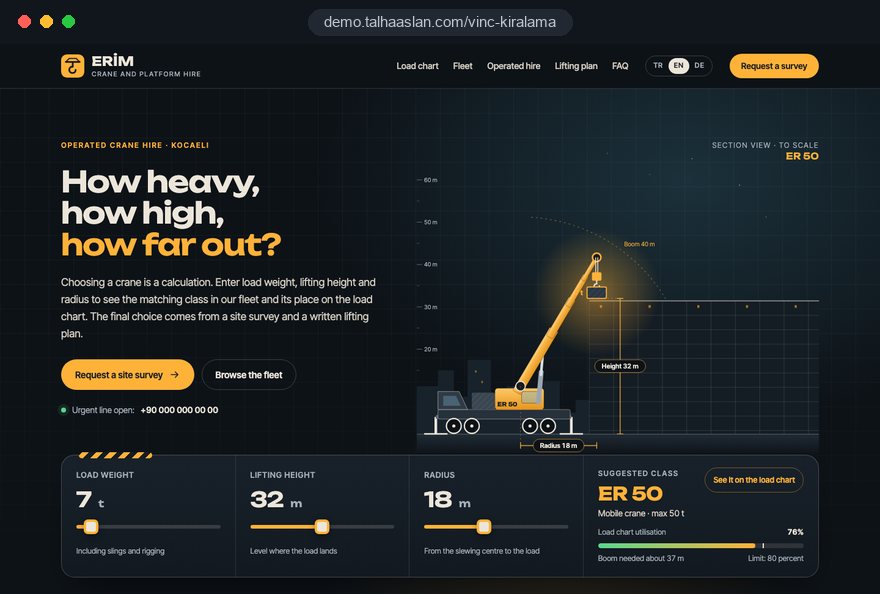
A crane hire website is not a showroom; it is a screening tool. The site manager, buyer or installation engineer who lands on it already has a load, a height and a rough idea of where a crane could stand. If the site cannot give a first answer to "can this firm's cranes do my lift", the visitor opens another tab before ever picking up the phone.
In this guide we, Talha Aslan and team, walk through the decisions we make, in order, when planning a site for mobile crane, cherry picker and heavy lift firms: fleet data, load charts, hire models, the enquiry flow, records, urgent requests, search and measurement. Our general project process is described on our web design service page.
01The three numbers behind every lift enquiry
Crane selection comes down to three numbers: the weight of the load, the radius from the crane's slew center to where the load lands, and the lift height. A crane hire site should talk about these from the first screen. Radius matters most, because the same crane lifts far less at a long radius than it does close in.
Most customers do not know these figures exactly. A short help box on the home page and fleet pages that explains how to estimate them is therefore worth its space:
- Load: the weight from the delivery note, the machine plate or the manufacturer's catalog, with a note that slings and lifting accessories count too.
- Radius: the horizontal distance between the nearest level spot where a crane could set up and the landing point; a rough measurement from an aerial map is enough for a first quote.
- Height: how high the load must go, plus anything it has to clear on the way, such as eaves, parapets or scaffolding.
- Ground: whether the set up area is tarmac, compacted hardcore, fresh fill or ground that may hide cellars or drains.
A site that explains these four points in plain language also shortens the first call. Whoever prepares the quote does not have to start with "how heavy, how far"; they can go straight to choosing the crane.
02Lead with capacity at radius, not headline tonnage
The tonnage in a crane's name is what it lifts at minimum radius in its most favorable configuration; what the customer needs is capacity at the radius of their own job. A page that only says "50 tonne crane" either raises false hopes in someone lifting a few tonnes at 20 meters or pushes them toward a larger crane than they need.
That is why we gather fleet data with your team in a single table before any design work starts:
- Record make, model and year for every crane, with the configuration you actually run.
- Add maximum capacity, main boom and fly jib length, and maximum hook height.
- Copy, exactly as printed, the capacity at the three or four radii your customers ask about most from the manufacturer's chart.
- Note vehicle dimensions, gross weight and outrigger spread; on tight urban jobs these are the first questions.
- Have the person who prepares quotes sign off the table, and make every later change in that table only.
This table becomes the single source for every crane page and the fleet comparison. Capacity you do not have and cranes you have sold never appear, so what customers see is what they can hire.
03The block order of a crane page
Every crane page should follow the same order, because customers open two or three cranes in a row to compare them and expect to find each figure in the same place.
- Title and summary: crane type, class and the jobs it is mostly used for, such as precast units, air handling units or curtain wall panels.
- Technical card: capacity, boom length, hook height, vehicle dimensions and outrigger spread.
- Capacity by radius: a simple three or four row table, with the full load chart below it.
- Hire model: whether the crane comes operated and whether a site survey is included.
- Jobs done with this crane: two or three short job summaries where you have them.
- Enquiry button: a link that opens the form with this crane already selected.
The last item looks small but changes measurement: the form records which crane page each enquiry came from. Photos sit next to the technical card and show the crane on a real job with outriggers out, not a decorative hero image. Lorry loaders and crawler cranes that get fewer enquiries can use a shorter version of the same blocks, but never a different order.
04Publishing load charts without inviting misreadings
The load chart is the most valuable document for a customer, but it should only be published as the manufacturer supplies it for your exact model and configuration. A chart retyped by hand or borrowed from a similar model can lead to a wrong decision on site.
These are the rules we follow when publishing:
- Source: the chart is scanned from the manufacturer's document or taken from its digital file; figures are never retyped on the site.
- Configuration: counterweight, outrigger setting and boom arrangement are stated in the chart's heading.
- Format: a readable image for phones plus a downloadable PDF named after the crane model.
- Note: one calm sentence next to the chart says that final capacity is set by the survey and the lift plan.
- Units: capacities are given in metric tonnes and labeled as such, because a US short ton is lighter than a tonne and international visitors will notice.
We write that note as information, not as a disclaimer in capital letters. Customers use the chart for a first check; the real decision happens at survey and planning stage. For firms that prefer not to publish charts openly, the capacity by radius rows plus the line "we send the full chart with every quote" are a sensible middle way.
05Cherry picker customers search by working height
People hiring a cherry picker or access platform think in working height, outreach and basket capacity, not tonnage, so platform pages should not be copies of crane pages. A sign fitter, a facade cleaner or an electrician working on street lighting wants to know where two people and their tools can reach.
What leads a platform page:
- Height: working height and platform height shown separately, with one sentence explaining the difference.
- Outreach: horizontal reach from where the vehicle stands to the facade or pole.
- Basket: safe working load in kilograms and the number of people.
- Machine type: truck mounted, tracked spider or scissor lift, with width for narrow courtyards and indoor jobs.
- Hire unit: hourly, half day or daily, and whether an operator is supplied.
Under LOLER in the UK, equipment used for lifting people must be thoroughly examined at least every six months, so a platform page is also a natural place to show the latest examination date. Platform customers are often small businesses who decide quickly. Phone and WhatsApp sit higher on these pages, and the form drops to two steps: job type and address, then date and contact. If you want to advertise a single platform model, a dedicated campaign page carries that short flow without disturbing the main site.
06Contract lift, operated hire and bare hire as separate products
Naming each hire model separately on the site prevents most arguments about responsibility on the day. Sending a crane with an operator, taking on the whole lift including planning, and, where you offer it, hiring a machine without operator are different products that ask different decisions of the customer.
The UK Lifting Operations and Lifting Equipment Regulations require every lifting operation to be properly planned by a competent person, appropriately supervised and carried out safely. Customers therefore need to know whether that planning duty sits with your team or stays with them. A section or page for each model answers:
- Crew: who arrives on site; whether an operator, slinger signaller or lift supervisor is part of the service.
- Survey: who visits the site, and which jobs you never quote without a visit.
- Lift plan: who writes it and what information you expect from the customer.
- Site preparation: who handles ground preparation, traffic management and permits.
- Standing time: what happens when wind or site conditions stop the lift.
These pages do not replace your contract terms, which stay in the contract and should be reviewed with your legal adviser. Their job is to let customers know which model they want before they ask. The same choice appears as the first step of the form, plus an "I'm not sure, advise me" option, so every enquiry reaches the right person and quote template.
07Finish the enquiry form with site access
Load and height pick the crane, but without access information showing the crane can actually get in and set up, the quote still needs a second call. So we build the form step by step and give access its own step:
- Job type: contract lift, operated hire or platform; if the visitor came from a crane page, that crane is preselected.
- Load: weight, dimensions, quantity and where the load is now.
- Location: address or a pin on a map, lift height and estimated radius.
- Access: gate width, slopes, overhead power lines or trees, and the ground where outriggers will go.
- Timing and contact: date, time window, flexibility, phone and preferred way to reply.
Photo upload sits in step four. Two photos of the entrance and the set up position do not always replace a survey, but they make clear who should go and in which vehicle.
Every unknown field gets an "I don't know" option, so nobody abandons the form over one question and you can see what is missing before you call. Because the form collects personal data, it links to your privacy notice and asks only for what the quote needs.
08An inspection records page that stays current
A records page that is built once and forgotten creates doubt rather than trust; an expired examination date looks worse than none at all. Under LOLER, lifting equipment exposed to deterioration must be thoroughly examined at least every 12 months, and at least every six months for equipment lifting people and for lifting accessories.
To keep that manageable on the site, we set up:
- Date on the crane card: each crane's last thorough examination date shows in one line and is edited in the admin panel.
- Report choice: some firms publish the report as a PDF, others write "available on request".
- Operator qualifications: described at team level by card scheme and category, never as a list of named people with personal details.
- Insurance: type of cover and validity date, stated plainly.
- Reminders: the admin panel can be set to warn you before a date runs out.
You decide which documents are published, and the legal assessment stays with your adviser. Our part is a structure where a site safety team finds the document they ask for in two taps and where dates cannot quietly go stale.
09Catching tomorrow's and today's requests
A large share of crane hire work is wanted for tomorrow or today, and handling it is a workflow decision more than a design one. We first write down who answers, during which hours and on which channel, and then build the site around that answer.
- Sticky buttons: click to call and WhatsApp stay visible on mobile; the WhatsApp message arrives prefilled with the crane page name and prompts for load, height and address. You can try such a link with our WhatsApp link generator.
- Out of hours form: job type, address, date and phone only; the request is logged and seen first thing in the morning.
- Honest reply times: the response time on the site is the one you can actually keep.
- One list: missed calls, WhatsApp messages and forms land in one place with their source.
Instead of scattering the word "urgent" across every page, state availability plainly. A line such as "for same day lifts, call before 9 a.m." tells customers exactly what to do and when.
Showing live fleet availability is possible, but only worth it if the calendar is genuinely kept up to date. A calendar that drifts produces calls about cranes that look free and are not.
10Writing finished jobs up as lift reports
Publishing each job as a short lift report persuades customers and search engines better than a references gallery. A photo captioned "factory installation" tells an engineer planning a similar job nothing; what the load was, how high it went and what constraints applied tells them a lot.
The skeleton of a lift report:
- Load: what was lifted, such as a transformer, a rooftop chiller or steel trusses, with approximate weight and size.
- Setup: crane used, radius, height and the ground the outriggers stood on.
- Constraint: a narrow street, night work, a live production floor or nearby power lines.
- Sequence: survey, plan, setup and lift in a few lines.
- Images: two or three real photos from setup and the lift itself.
Use the client's name and exact site location only with written permission; otherwise "a manufacturing plant near Birmingham" is enough. Check photos for other companies' logos, people's faces and number plates.
Over time, regular lift reports become an archive that can be filtered by crane type and area, and they supply the real content of your area pages.
11Showing up for tonnage, crane type and town searches
Customers rarely type only "crane hire"; they search for things like "30 tonne mobile crane", "cherry picker hire Leeds" or "lorry loader hire", combining tonnage, type and place. The site structure has to answer each of those three axes.
- Type and tonnage: a category page for each crane type and a page for each crane, with real tonnage and type in the titles.
- Area: pages only for towns and regions you really serve, with lift reports from that area, access notes and the industrial estates you work on.
- Google Business Profile: the business name matches the real world name with no added keywords; service area businesses can hide their address.
- Structured data: company details and service area are marked up for search engines, but only information that appears on the page. You can check the markup with our schema markup tool.
Our wider approach to search is on the SEO service page. For same day searches, Google Ads management makes sense when campaigns are limited to specific crane types, areas and the hours you can answer.
The ad and its landing page must talk about the same crane. Google's Quality Score is built from expected click through rate, ad relevance and landing page experience; advertising a 50 tonne crane and sending the click to a generic home page weakens two of those at once.
12A fast crane hire site for a phone on site
A crane hire site is usually opened on a phone at a construction site with a weak signal, not at a desk, so speed and mobile readability are basic requirements rather than preferences. Google's Core Web Vitals count as "good" at the 75th percentile when LCP, which measures how fast the main content loads, is 2.5 seconds or less; INP, which measures response to taps, is 200 milliseconds or less; and CLS, which measures layout shift while loading, is 0.1 or less.
- Tables: technical tables never need sideways scrolling; on narrow screens, rows turn into cards.
- Files: load chart images are compressed, PDFs kept small and the file size shown next to each link.
- Photos: served in modern formats and sized to the screen.
- Contact: phone and WhatsApp stay within reach at every scroll position.
Our mobile friendly test shows how your current site looks on a phone in a few minutes.
For measurement, calls, forms and WhatsApp clicks are tracked as conversions. In the EU, cookie consent is needed before non essential tracking and Google requires consent mode for its measurement and ad features there; check the rules for your own market. We read reports by which crane and area pages bring enquiries and how many become jobs, not by visitor numbers.
13Common mistakes on crane hire websites
Most of these mistakes come not from design but from moving fleet data and workflow onto the site without thinking them through. Each comes with what to do instead.
- Listing only maximum tonnage: show capacity at the radii your customers ask about, plus the load chart.
- Using a similar model's load chart: publish the manufacturer's chart for your configuration, or send it on request.
- Leaving sold cranes online: make the fleet table the single source and redirect a retired crane's page to a similar crane or the enquiry page.
- An undated records page: show the examination date on each crane card, editable from the admin panel.
- Cloning one text for every town: open area pages only where you work, filled with lift reports from that area.
- Blurring the hire model: explain contract lift and operated hire separately and let customers choose in the first form step.
Run through this list against your current crane hire site. If two or more items apply, rebuilding the fleet table and the enquiry flow before any visual redesign will pay off faster; the new look comes after.
14Choosing a partner and your next step
In a first meeting with an agency, notice how many questions they ask about fleet data and the quote flow before they show design samples. The team that should build your crane hire website is the one that wants to understand load charts and what your estimator needs.
Questions we suggest asking:
- Who collects the fleet data, and which single table will the crane pages be generated from?
- Who updates examination dates and crane details after launch, and in which panel?
- Will the form record which crane, which area and which channel each enquiry came from?
- Which reports will we receive in the first months after launch, and how often?
We do not have a live client project in crane hire yet, so we show our approach on the live demo site linked on this page. On the demo you can try the fleet pages, the enquiry form that asks for load and height, and the records section on your phone; it is not a client site. Our work in other sectors is on the references page.
You can review packages and scope in our web design pricing section and write to us with your crane and platform list through the contact page. In that call we go through your fleet, hire models and coverage area, then send a written scope and quote.