Services without timings
Cut and finish, root colour, balayage and keratin share one list with a line each. Clients find out in the chair that balayage can take half a day, and your diary cannot plan around it.

Your Windows contrast theme is on; colours come from your system.
Your device is set to reduce motion; animations are already off.
Your choices are saved in this browser only.
Industry-specific web design
Before visiting a hair salon or a barber, people usually ask three things: is there a slot today, how long will it take and who will cut my hair. In most salons those answers sit on the phone, in the DMs or on the price board behind the desk. We build hair salon websites around those three questions: a service menu with timings, a current price list, the team and a slot chosen by stylist, for salons in the UK and elsewhere working with a remote team.
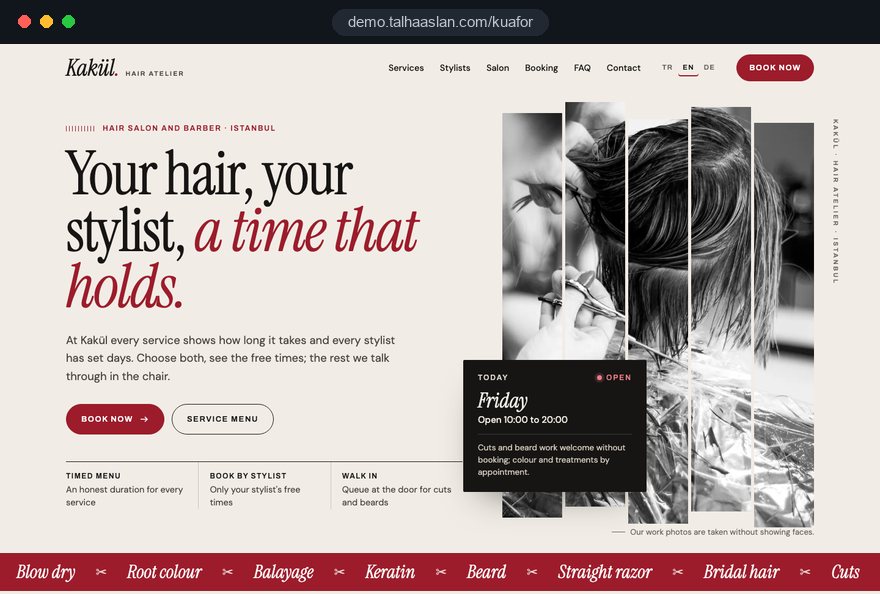
Open the live demoA demo design we built for a fictional brand
In short
A hair salon website shows every service with its timing, from cuts and colour to beard trims and bridal hair, publishes a price list that matches the one in the salon, introduces each stylist or barber with their work and lets clients choose their stylist and time themselves. Barbers benefit most from quick appointments and maps visibility; colour led salons need clear timings and consultations.
Talha Aslan and teamLast updated:
Why it needs its own approach
A salon day runs in short slots, and an empty half hour never comes back. A generic business template tells the story of the salon rather than showing the service, the timing and the stylist.
Cut and finish, root colour, balayage and keratin share one list with a line each. Clients find out in the chair that balayage can take half a day, and your diary cannot plan around it.
The price list on the site was uploaded years ago and no longer matches the board in the salon. A client who sees a different figure at the desk loses trust before the cut has even started.
Barbershop clients are often loyal to one barber rather than the shop. Without names, specialities and working days on the site, regulars call every time and new clients have no idea whose chair to book.
According to the Hair Council, anyone in the UK can work as a hairdresser or barber without training or qualifications, and state registration is voluntary. Salons that are registered or trained rarely say so on their site, so clients cannot tell the difference.
A page of hand-picked screenshots looks convincing but can backfire. CMA guidance says a trader may infringe the law by suppressing genuine negative reviews or selectively promoting positive ones, including on its own website.
Opening hours, closing days and phone numbers differ between the site, Google Business Profile and Instagram. Someone looking for a barber nearby who finds a closed door rarely tries again.
Sources: The Hair Council: state registration for hairdressers and barbers · CMA: Fake reviews guidance (CMA208), section on suppressing and cherry-picking reviews
Our approach
We build a hair salon website in the order the day actually runs: the client picks a service, sees its timing and price, chooses a stylist and moves to a free slot. Because timings are set from the start, long colour appointments take the right space in the diary and short cuts do not get squeezed in where they will not fit.
If clients should pick their own time, an online appointment system is connected with each stylist's working days; if you advertise for wedding season or a new branch, a single-goal landing page can go live without disturbing the main site. For barbers we add a short open today panel for walk-in clients.
Design, development and content sit in one team, so the price list, gallery and appointments are not patched on later. Talha Aslan sets the strategy and an experienced team handles delivery; we work remotely and in English with salons abroad.
Home
Every service line shows its timing, its price and the stylists who offer it; the appointment step starts with choosing the service and the stylist.
The right setup
All three start from the same foundation; how far ahead clients plan and who they choose makes the difference.
Longer appointments
Colour and treatment appointments can take hours; clients research and plan ahead.
Quick and regular
Clients come back to the same barber every few weeks; speed, time and location decide it.
More than one site
Clients look for the nearest branch and a stylist there; each branch has to be found on its own.
Built for hair salons
These are the points that need deciding most often when a website for hair and barbering services is planned.
For each service: what is included, a rough timing and which stylists offer it. For long colour work we note that timing depends on hair length and thickness, so clients arrive with the right expectations.
The list is edited in one place in the admin panel and stays in step with the board in the salon, with any extras such as a long hair supplement shown clearly. If you prefer not to show prices online, a from price or a WhatsApp question is an option.
A photo, speciality, working days and a selection of each stylist's own work. When someone joins or leaves, you add or remove them in the panel and the appointment calendar follows automatically.
Because state registration with the Hair Council is voluntary in the UK, qualifications, registration and training are a real differentiator. We give them a place on each profile, stated plainly and only where they are true.
Following CMA guidance, reviews are not filtered to show only the positive ones. If you collect reviews on the site, we publish them in a consistent way with a short review policy; otherwise we link to your Google Business Profile.
A separate page for weddings, proms and events that are booked well in advance: trial sessions, salon or on location options and a consultation form. In wedding season this page also becomes the landing point for ads.
Sources: The Hair Council: state registration · CMA: Fake reviews guidance (CMA208)
Comparison
| Topic | Generic business template | Site built for a hair salon |
|---|---|---|
| Services | A short list without timings | Every service with timing, description and stylists |
| Prices | An old PDF or nothing at all | A list that matches the salon and is updated in the panel |
| Team | One group photo | Stylist profiles, working days and their work |
| Appointments | A phone number and a contact form | A few taps from service and stylist to appointment |
| Hours and location | Different details on the site and maps | The same details on the site, maps and Instagram |
| Measurement | Visitor numbers | Which service and which stylist bring appointments |
Quick check
Must haves: does your site have them?
0 of 6 in place Tick the boxes to see where your site stands.
Added as needed
We choose which of these you need together during the scoping call.
Share your service menu, your stylists and how you take appointments today; we will come back with a page structure and a written quote.
Process
We define your business, your audience and the site’s one-sentence job: who it sells what to, through which action. Scope and timeline are written from that answer.
The home page and key templates come to you as designs first; no code is written before your approval. We do not like surprises, and we do not cause them.
The approved design becomes fast, secure, maintainable code. You follow progress in the CRM and see every page in a staging environment before launch.
The site goes live with analytics, Search Console and conversion tracking connected; panel training is given, first-year hosting and maintenance included.
Search and speed foundations
Most hair salon and barber searches are local: barber near me, hairdresser plus the name of a neighbourhood. The contact page, address details and Google Business Profile are set up to support each other.
Searched services such as balayage, keratin, bridal hair or skin fades are described under their own headings together with your area, so the salon is found for what it does, not only for its name.
Your site is mostly opened on a phone, on the way or outside the door. Gallery images are compressed, the appointment step sits on the first screen and Core Web Vitals are measured before launch.
Appointments, calls, WhatsApp clicks and direction requests are tracked as conversions from day one, so you can see which service, which stylist and which post bring clients.
Free tools
Before planning a new site, check how your current pages look on a phone and in search. You can also create a QR code for the mirror, an Instagram bio, hashtags for your posts and a WhatsApp appointment link. The tools are free and need no sign up.
Tech SEO
Test whether a page works well on phones: viewport, font size, tap targets, a mobile screenshot and Core Web Vitals.
Tech SEO
Scan any URL for title, meta description, headings, canonical, indexability and speed signals, and get an SEO score with a clear to-do list.
Conversion
Create a wa.me link with a preset message + embeddable button code.
Conversion
Turn URLs, WhatsApp, Wi-Fi, vCard and text into a QR code in seconds; download high-res PNG or SVG.
Bio
Write an Instagram, TikTok or X bio in seconds: hundreds of short, aesthetic and funny bio ideas, a builder for your name and niche, plus fancy fonts.
Social
Pick a topic and niche; get a balanced big, medium and niche set that fits Instagram's 5 hashtag limit.
How we work
We have no published website project in this field yet, so we show our approach on a live demo site built for this purpose. You can see our work in other sectors on the references page.
Live demo
For this field we built a one page demo site for a fictional brand, made only to show our approach. You can explore the design, the copy structure and the mobile view live in three languages.
Open the live demoBefore any design, we put your services, their timings and who does what into one table and turn the questions you hear most often on the phone into the page plan.
We go through your stylists' working days, breaks and the room you keep for walk-in clients, and open the online calendar accordingly.
We align opening hours, closing days, address and phone number across the site, Google Business Profile and Instagram.
After launch we track which services and which stylists bring appointments and update the pages with you based on what we see.
Related pages
Industries
A neighbouring field built on facials, laser and spa packages.
Solutions
Let clients choose their stylist and time from a calendar themselves.
Industries
A similar setup where clients choose the artist by their portfolio.
Solutions
A single-goal page matched to ads for wedding season or a new branch.
 Lead Form Design for Booking, Quote and Demo Requests: UX Rules That Lift ConversionsRead article
 How to Do Google Maps SEO: A Guide to Ranking Your Business Higher on the MapRead article
 Google Business Profile Post Views Are Back: What the New Post Report Shows and How to Read ItRead article
 What Is Mobile First Design? How Mobile First Affects Your SEO RankingsRead article
FAQ
If your question is not here, write to us; we will send you an answer and a written quote.
Next step
In a free 15-minute call, in English, we will go through your services, your team and your appointment setup, then send a written scope and quote.
In-depth guide
A hair salon website earns its keep by answering, once and for good, the three questions your front desk hears all day: how long does it take, who will do it and when is there a free chair. If those answers are vague online, the phone keeps ringing while the scissors are in someone's hand and messages pile up overnight.
This guide follows the decisions a salon owner, barbershop owner or hairdresser running a small team makes during a website project, in the order they come up. Rather than general design advice, it centers on a diary that runs in short slots, clients who are loyal to one stylist and people searching for a barber nearby on their phone.
The foundation of a hair salon website is not the design but an honest timing for each service, and that timing works far better split into the time the stylist is busy and the time the hair is processing. During a root color, the color goes on and then sits; in that gap the stylist can fit in a beard trim or a short cut. If the booking calendar does not know this, you either lose time or end up with two clients waiting at once.
Build the timing table in this order:
Clients never see the processing detail. They see a rough total and a note that the time may run longer depending on hair length and thickness, while the split works in the background of the calendar.
Your online price list should follow the same logic and the same wording as the board in the salon, so no client meets a tier or a surcharge for the first time at the desk.
Make these decisions before anything is published:
If you decide not to publish prices, showing services and timings with a quick WhatsApp question for prices is an honest alternative. Keep the description and timing on each line anyway; clients then know exactly what they are asking about, and you stop typing the same explanation every evening.
A stylist profile is not a staff card; it is the page where a client decides whose chair to book, so it has to contain information that supports that choice. In a barbershop, clients are often loyal to one barber rather than the shop; in a ladies' salon, they look for a particular colorist or a stylist for bridal hair.
Each profile should include:
When someone leaves, redirect their old profile address to the team page instead of deleting it, so clients searching their name still find your salon. Photograph the whole team the same way, with the same background, light and framing, and write each profile together with the stylist; their own answer to what they love doing reads far more convincingly than anything an agency invents.
Online booking only works when it writes down rules you already apply in the salon; a calendar opened without rules simply moves the phone chaos onto a screen. The flow should follow the client's order of decisions: service, stylist, day and time, then contact details.
Before opening the calendar, answer these questions with your team:
Once those rules are clear, a website with online booking uses each stylist's working days and service timings to show only slots that genuinely work. The confirmation message should include the rough duration, the stylist's name and a map link, so the client has nothing left to ask on the way over.
In the first weeks, opening the calendar for a few stylists and limited hours is a sensible way to see how the rules behave on a real day. Fix what goes wrong, then extend it to the whole team.
A missed appointment is a lost hour that never comes back, and the first step toward fewer of them is a cancellation policy written calmly and clearly on the site. When the rule only lives in the stylist's head it turns into an argument every time; when it is written down, the client accepts it while booking.
A workable setup looks like this:
Keep the tone respectful rather than punitive; explaining that the stylist could have offered the hour to someone else is enough for most people. Have a legal adviser look over any wording on deposits or charges before it goes live.
For long color services, a few details collected before the appointment make both timing and results more predictable, but the form should never ask for more than it needs. Whether the client has used henna or box dye, when the last chemical service was done and a reference photo of the target shade are usually enough.
Keep these limits in mind when you build it:
If the color manufacturer's instructions call for a skin test before the service, say on the service page that it happens in the salon ahead of the appointment. Make sure the answers reach the stylist's booking record as well; a form that only lands in a shared inbox becomes a box nobody in the salon reads.
Barbershop clients usually decide on the street, on a phone, in seconds, so the first screen of a barber site has one job: show whether you are open today and the quickest way in. Today's hours, a call button, directions and the next free slot belong at the top of the page.
Google's Core Web Vitals give a useful frame for measuring speed:
You can see how your current site behaves on a phone with our free mobile friendly test in a few minutes. Show closing days and holiday hours on the first screen too; someone who finds a locked door usually walks to the next barber and does not come back.
If you work walk in only, keep any busy indicator simple. A weekly note on the hours that are usually quiet is more reliable than a live queue counter that misleads the moment nobody updates it.
A hair salon gallery is where clients choose a stylist and a style, and scattered photos in different light with unclear consent cannot do that job. A photo where the client can be identified is personal data, so it needs a clear legal basis, and for marketing use that in practice means consent.
A shooting routine that works in a busy salon:
When a client withdraws consent you need to know where the photo was used, so keep a simple log of the photo date, consent date, stylist and every place it was published. With that, a removal request takes minutes rather than an afternoon.
Most people looking for a hair salon or barber nearby decide on the map, and when the maps profile and the website disagree, both lose credibility. Google Business Profile guidelines say the business name must match the real world name without added keywords, so adding a neighborhood or service to the name puts the profile at risk.
Checklist for keeping profile and site in step:
The technical and content work for local search is a topic of its own, which we cover together with the maps profile as part of our SEO service. If you run several salons, each branch needs its own profile and its own page with address, hours and team.
Not every service needs a page; a separate page makes sense for services people search by name and research before booking. Cuts and blow dries are explained well enough by a line on the menu with time and price, while balayage, keratin smoothing, bridal hair, perms or beard design tend to work better on their own page.
A dedicated service page should cover:
If your salon also offers facials, nails or brows, plan that area separately from hair; we cover the needs of session and package based treatments in our guide to beauty salon websites. A simple test before opening a new page: if the same question about a service reaches you by phone or message several times a month, there is already enough to write. A page for a service nobody asks about tends to stay thin and is better left as a line on the menu.
Instagram shows the work and the website turns interest into an appointment; once each channel has its own job, both perform better. Your bio link should not point to the home page but to the booking step, with your most booked service preselected.
Use the salon itself as a signpost:
For wedding season, prom season or a new branch opening, send ad traffic to a page built for that job rather than the home page. A bridal hair page explaining trials, on location styling and the consultation form becomes the matching landing point when you run Google Ads management, and makes it far easier to see what the budget brought in. Before launching, check that the page loads fast on a phone, the form works and the conversion is recorded correctly.
Visit counts mean little to a hair salon; what matters is which service, which stylist and which channel produced appointments. For that, completed bookings, call button taps, WhatsApp clicks and direction requests should be tracked as separate events from day one.
Plan measurement and the legal pages together:
If you use Google advertising or measurement features for visitors from the European Economic Area, Google requires consent mode, so plan it into the setup.
Most of the mistakes we see on hair salon websites come not from design but from the salon's real routine never reaching the site. The most frequent ones, each with the better alternative:
Nearly all of these can be avoided with an hour's work on the timing table, the booking rules and the photo routine before launch, ideally with a senior stylist and whoever answers the phone in the room.
When choosing who builds your hair salon website, look at how they listen to your routine before you look at their portfolio; a team that does not ask about your service timings, your stylists and your walk in policy in the first call cannot set up the calendar properly. You can see our work in other sectors on our references page.
Questions worth asking in that call:
You can see our approach step by step on the live demo site linked on this page. To shape the scope, read through how our web design service works, compare fixed packages in the pricing section or get in touch with us with your service menu and team, and we will work out a page structure and a written quote with you.
Start a Project
Thanks {name}, we've received your brief. We usually reply within the same day.
What happens next?