Produce listed without seasons
Cherries still look available in October, while this year's new crop was never added. When buyers cannot see what is ready and when, they phone to ask or move on to a grower who publishes a clear calendar.

Your Windows contrast theme is on; colours come from your system.
Your device is set to reduce motion; animations are already off.
Your choices are saved in this browser only.
Industry-specific web design
Buyers usually find a farm by searching for a crop, and before anything else they want to know three things: when it is ready, how much you can supply and which certificates stand behind it. We build farm websites around produce pages with harvest seasons, a wholesale enquiry form and a clear certificates page, for growers in the UK and elsewhere working with a remote team, and for Turkish producers who sell to buyers abroad.
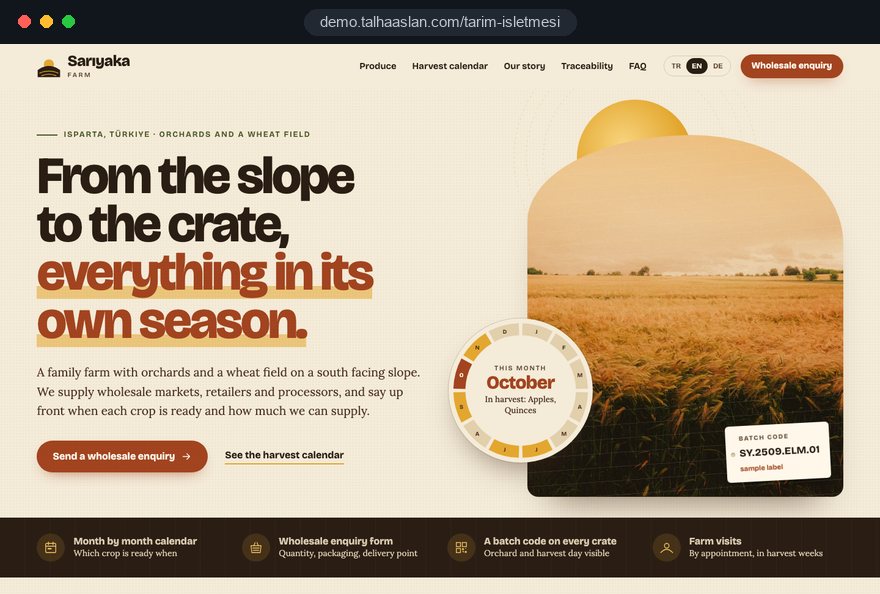
Open the live demoA demo design we built for a fictional brand
In short
A farm website shows which produce is ready in which month, asks wholesale buyers for quantity and delivery details up front and presents each certificate with its scope. The word organic is used only for certified produce; in the UK, using it without certification is against the law. The same structure suits farms selling direct to consumers, where ordering, delivery areas and farm visits come first.
Talha Aslan and teamLast updated:
Why it needs its own approach
A farm website talks to wholesalers, retailers and processors as well as to families who want to know where their food comes from, and the range on offer changes with the seasons. Generic business templates plan for neither the two audiences nor the harvest calendar.
Cherries still look available in October, while this year's new crop was never added. When buyers cannot see what is ready and when, they phone to ask or move on to a grower who publishes a clear calendar.
The form asks only for a name and a phone number. Without quantity, packaging, delivery point and date, every enquiry needs several calls before anyone can quote, and the buyer waits for days.
Organic, GLOBALG.A.P. or Red Tractor certificates sit in a folder, or show up only as a small logo in the footer. If the site does not say which produce, which land and which period a certificate covers, it does little to reassure a buyer.
In the UK, GOV.UK guidance states that using the word organic in labelling or advertising for food that has not been inspected and certified is breaking the law. A site that calls uncertified produce organic exposes the farm to enforcement and reputational risk.
A site built from stock photos looks like every other farm. Without the fields, greenhouses, orchards, harvest and people, the site has nothing to show at the moment a buyer wonders where the produce comes from.
Harvest begins, a new variety is added or a certificate is renewed, and the change waits in someone else's queue. In the busiest week of the season, the site still shows last year's information.
Sources: GOV.UK: Organic food, labelling and advertising rules
Our approach
We build a farm website in the order buyers ask their questions. First they see the produce and when it is ready, then they check the certificates and where it is grown, and finally they enter a quantity and send an enquiry. That is why every crop has its own page, every page carries its season and every page ends in the same wholesale enquiry form.
If you sell to buyers in other countries, we set up a multilingual structure from day one; if your range is wide, a catalogue structure comes with a downloadable product list. If you plan to sell direct to consumers, we look at the ordering flow separately as part of an e-commerce setup.
Design, development and content sit in one team, so the harvest calendar, the enquiry form and the certificates page do not drift apart. Talha Aslan sets the strategy and an experienced team handles delivery. We work remotely and in English with farms abroad.
Home
Each produce page answers its own search, and all of them lead into the same wholesale enquiry form.
The right setup
All three start from the same foundation; who you sell to and which certificates you hold make the difference.
Wholesale
Buyers think in tonnes, dates and reliable supply, so the site answers those three questions.
Direct sales
Customers want to see where their food comes from, so the site puts the farm and the grower first.
Certified and export ready
Buyers research from another country and look at the certificates first, so the site speaks their language and shows the paperwork.
Built for farms
These are the points that need a decision most often when a farm website is planned.
For every crop: variety, grade or size, harvest window, packaging options and storage. Produce that is out of season is not deleted; it stays on the site with the next harvest date, so search engines keep the page too.
Fields for produce, quantity, packaging, delivery point and required date. Everything your sales side asks before quoting is in the form, and enquiries are collected in one place together with the page they came from.
For each certificate: which produce, which land and which period it covers, the body that issued it and the expiry date. An expired certificate never looks current on the site.
GOV.UK guidance says produce may be labelled organic only if it meets organic production rules and is certified by an approved control body, and the same applies to advertising. We use the word only for certified produce and describe growing methods elsewhere; the final legal assessment belongs to the farm.
Fields, greenhouses, orchards or barns; the methods you use, the team and the years of work behind the produce. Real photos and short videos build a kind of trust stock images cannot.
A QR code on the packaging can open the produce page or its batch details, so buyers and consumers can see which orchard and which harvest the produce came from.
Sources: GOV.UK: Organic food, labelling and advertising rules
Comparison
| Topic | Generic business template | Site built for a farm |
|---|---|---|
| Produce information | Crop names and a few photos | Variety, packaging and harvest window for every crop |
| Seasons | The same list all year | Which produce is ready in which month |
| Wholesale enquiries | Name, phone and message fields | A form asking quantity, packaging, delivery point and date |
| Certificates | Logos in the footer | A certificates page with scope and validity |
| Images | Stock photos of fields and fruit | Your own fields, greenhouses and team |
| Measurement | Visitor numbers | Which produce page brings wholesale enquiries |
Quick check
Must haves: does your site have them?
0 of 6 in place Tick the boxes to see where your site stands.
Added as needed
We choose which of these you need together during the scoping call.
Share your crops, your harvest months, the buyers you sell to and the certificates you hold; we will come back with a page structure and a written quote.
Process
We define your business, your audience and the site’s one-sentence job: who it sells what to, through which action. Scope and timeline are written from that answer.
The home page and key templates come to you as designs first; no code is written before your approval. We do not like surprises, and we do not cause them.
The approved design becomes fast, secure, maintainable code. You follow progress in the CRM and see every page in a staging environment before launch.
The site goes live with analytics, Search Console and conversion tracking connected; panel training is given, first-year hosting and maintenance included.
Search and speed foundations
Buyers do not only search for a crop; they add a region, a variety or the word wholesale, such as Cornish new potatoes, wholesale tomatoes or olive oil producer. Produce pages and the Google Business Profile are built to answer those searches.
Produce pages updated weeks before harvest are already in search results when buyers plan their supply. Out-of-season pages are not deleted, so the visibility they earned carries into the next year.
Farm name, address, phone and opening hours are marked up so search engines can read them; pages are designed for phone screens first and images are compressed.
Calls, form submissions and WhatsApp clicks are tracked as conversions from day one, so you can see which crop and which language version bring enquiries.
Free tools
Before planning a new site, see where the current one stands; create a QR code for your packaging and a WhatsApp link for your buyers, and shrink your produce photos. The tools are free and need no sign up.
Tech SEO
Test whether a page works well on phones: viewport, font size, tap targets, a mobile screenshot and Core Web Vitals.
Tech SEO
Scan any URL for title, meta description, headings, canonical, indexability and speed signals, and get an SEO score with a clear to-do list.
Conversion
Turn URLs, WhatsApp, Wi-Fi, vCard and text into a QR code in seconds; download high-res PNG or SVG.
Conversion
Create a wa.me link with a preset message + embeddable button code.
Image
Resize + compress photos and cut the KB; never leaves your device.
Calculator
Length, weight, temperature, volume, area and speed; all units in one table.
How we work
We do not have a live client project in agriculture yet, so we show our approach on a live demo site. The demo is not a client site. You can see our work in other sectors on the references page.
Live demo
For this field we built a one page demo site for a fictional brand, made only to show our approach. You can explore the design, the copy structure and the mobile view live in three languages.
Open the live demoIn the first call we put your crops, varieties and harvest months into one table; the produce pages and the harvest calendar are built from it.
Scope and expiry dates come from the certificates themselves, and we do not publish a quality or growing claim you cannot back up.
We list what a wholesale buyer has to tell you before you can quote, and the fields of the enquiry form come from that list.
We track which produce page and which language version bring enquiries, and update the pages with you before each harvest.
Related pages
Solutions
For farms that want to present a wide range with a downloadable product list.
Solutions
A language version per market for farms selling to buyers abroad.
Industries
For packing and processing plants: a factory site built around technical data.
Solutions
A single-goal page matched to an ad for harvest time or a trade fair.
 How to Build a B2B Website: Site Structure That Generates Qualified LeadsRead article
 Lead Form Design for Booking, Quote and Demo Requests: UX Rules That Lift ConversionsRead article
 Professional Photography for Websites: What It Adds and How It Beats Stock PhotosRead article
 Website Storytelling: How to Tell a Company Story That ConvertsRead article
FAQ
If your question is not here, write to us; we will send you an answer and a written quote.
Next step
In a free 15-minute call, in English, we will go through your produce, your season and your buyers, then send a written scope and quote.
In-depth guide
A farm website has to present a range that changes month by month, answer the tonnage questions of wholesalers and processors, and show exactly what each certificate covers, all at once. We wrote this guide for growers, orchards, greenhouse operations and agricultural businesses that want their site organized the way a buyer thinks.
The sections follow the order in which decisions get made on a project: who you sell to, then season data, produce pages, the enquiry form and certificates, then photography, traceability, direct sales, export buyers, search and measurement. Each section gives you something to apply today.
The structure of the site follows the type of buyer that brings in your revenue, not the list of crops you grow. A wholesale market trader, a supermarket category buyer, a processing plant, an importer and a family ordering a weekly veg box all look for the same tomatoes with very different questions. On a wholesale farm the first screen belongs to produce, season and the enquiry form; on a farm selling direct it belongs to the grower, ordering and delivery areas.
Bring answers to these questions to the first call; they decide the menu order and the default path of the form:
Write the answer down as one sentence, for example "wholesale cherries are the core business, farm boxes are a side line". Every design and copy debate later gets settled against that sentence.
A harvest calendar should be a data table that feeds the whole site, not a picture. Uploaded as an image, it has to be redrawn every year, it soon contradicts the produce pages and search engines cannot read what is inside it. Kept as a table, the produce pages, the calendar page and the downloadable list all draw from one source.
We build that table with you in five steps:
The status field is the most frequently changed piece of information on a farm website, so it should take one tap in the admin panel and work comfortably on a phone. When harvest slips by weeks, change the status rather than the months, so buyers see the delay instead of dates that silently move.
A produce page should answer the questions a wholesale buyer would otherwise ask on the phone. Before asking for a price, a buyer wants to know exactly what the product is, how it is packed and how well it keeps. If that information is missing, the enquiry gets completed on the third call instead of in the first message.
Do not delete a page when its crop goes out of season. Keep the same address, show the status as out of season and state the next harvest window; a deleted page loses both its search visibility and the buyer's bookmark. If your range runs to hundreds of lines, a filterable catalog structure is easier for you and the buyer than managing pages by hand.
A good wholesale enquiry form collects everything your sales side needs before quoting, in one go, and nothing more. The person who builds quotes on the phone should define the fields, not a designer. In the first meeting we ask that person how they completed the last ten enquiries and turn the answers into the field list.
Once the form is sent, the buyer should get an automatic reply saying when you will respond, and the enquiry should land in your inbox, and on WhatsApp if you want, tagged with the page it came from. Keep required fields to five and make the rest optional; that balance keeps the data complete without people abandoning the form. A click to call button should stay visible on every produce page for buyers who prefer the phone.
The certificates page should answer an auditor's questions before anyone opens a PDF. A logo tells a buyer that a certificate exists, but not which crops, which fields and which period it covers. GLOBALG.A.P., Red Tractor or an organic certificate shown without its scope sends the buyer straight back to the phone.
For each certificate the page should show:
Enter expiry dates in the admin panel and have a reminder sent a month before each one. An expired certificate that still looks valid is a bigger trust problem than a certificate that is not shown at all. We always work from the certificate itself and never widen its scope in our own words.
Link certificates to produce pages as well. A buyer on the cherry page should see only the certificates that cover cherries, without scanning the whole list.
Use the word organic only for produce that is certified by an approved control body. In the UK, GOV.UK guidance states that using organic in the labelling or advertising of food that has not been inspected and certified is breaking the law.
In the EU, Article 30 of the EU organic regulation governs terms referring to organic production, and in Turkey, Article 8 of Law No. 5262 reserves the organic label and logo for organic products and requires promotion that does not mislead. Website copy, product names and image captions all count as promotion.
Uncertified produce grown with care still has plenty to say; it just needs methods instead of claims. We run this check at the copy stage:
The final legal assessment belongs to the farm and its adviser. We prepare the copy against this checklist and flag every doubtful phrase to you before publishing.
Real photos of fields, greenhouses and harvest answer a buyer's question about origin at the moment it comes up; stock images make every farm look the same. Treat photography as a plan that runs through the season rather than a single shoot, so each produce page opens with an image of its own harvest.
Caption photos with place and month; a short note like "May, upper orchard" turns an image into evidence. Many buyers open the site in a market hall or a packhouse on a weak mobile signal, and phone photos are often several megabytes, so run them through an image resizer before upload.
Google's Core Web Vitals give a concrete target. LCP, which measures how long the largest element takes to load, is good at 2.5 seconds or less; INP, which measures how quickly the page responds to a tap, at 200 milliseconds or less; CLS, which measures layout shifting during loading, at 0.1 or less. On produce pages led by a large photo, LCP mostly depends on that image, and fixed image dimensions prevent the shifting.
A QR code on the packaging connects the product on the shelf to your farm website when it opens the produce page or the details of that batch. For this to work, the address it opens must not change for years; thousands of printed cartons should never turn into broken links after a redesign.
The fields we suggest for a batch page:
Start simple: one code pointing to the produce page adds value before any batch system exists. Generate the code with a QR code generator, print it at actual size on the real packaging and test it with several phones, under cold store lighting and on a curved surface. Keep the quiet zone around the code and keep it clear of seams and folds.
When you sell direct, the site has to answer "how does this reach me" on the first screen. Customers want to see the farm and the people behind it, but at the moment of decision they look for delivery areas, how to order and what is ready now.
As orders grow, a WhatsApp based process stops being enough. Once stock, payment and delivery slots need to be managed together, a full e-commerce setup is worth assessing, and we plan for that from the start by building produce pages and addresses that can later turn into a shop. Every form that collects personal data needs a privacy notice, the order form included.
An overseas buyer wants to read your site in their own language and trade terms, and to see the certificates first. An English page produced by raw machine translation can mangle variety names and pack sizes, and an importer's quality team notices on the first read. We recommend a separate, carefully written version per market.
Language versions are connected with hreflang annotations; each version must reference itself and all the others, otherwise Google cannot pair them correctly. We cover the setup in detail on our multilingual website page. Keep the number of markets small, since two well maintained languages bring more enquiries than five neglected ones. Decide which language to add by looking at where your enquiries came from over the last two seasons.
Agricultural buyers usually search for a crop together with a region, a variety or the word wholesale, and each produce page should answer one of those searches. Queries like "Kent cherries wholesale", "Turkish dried apricots supplier" or "vine tomato grower" belong to the matching produce page, not the home page.
A farm that sells only wholesale and does not receive visitors can hide its address and show a service area; with a farm shop or visiting days, the address should be visible. As the number of produce pages grows, technical structure and internal links matter more, and we plan that together with the harvest calendar as part of our SEO service. Check how a busy produce page opens on a phone with the mobile friendly test; buyers usually land on that page directly, not on the home page.
Visitor numbers say little to a farm; the real question is which produce page brings enquiries, in which month and in which language. Setting up measurement from day one lets you end the season with data rather than guesses.
Measurement tools process personal data, so a privacy notice and cookie consent belong on the site. In the EU, consent is needed before non essential tracking, and Google requires consent mode for measurement and personalized advertising features for visitors in the European Economic Area; if you sell into Europe, set this up from the start. Marking enquiry quality takes seconds, but only those marks show which page actually sold produce.
Most of these mistakes come from treating the site as a one time job rather than bad intent. Each item includes the better alternative:
You can check your current site against this list today. If more than two items apply, the problem lies in the structure rather than the design, and planning a new structure may take less effort than patching the old one.
Choose the team for your farm website by how quickly it understands your season and your buyers. A team that shows designs before asking about your range, harvest months and certificates is heading for a generic template. Ask these questions before you take a quote:
We do not have a live client project in agriculture yet; we show our approach on a live demo site linked on this page, and the demo is not a client site. You can read about scope and process on our web design service page and see fixed packages in the pricing section. Share your produce list, harvest months and certificates through the contact form, and we will work out a page structure and a written quote with you.
Start a Project
Thanks {name}, we've received your brief. We usually reply within the same day.
What happens next?