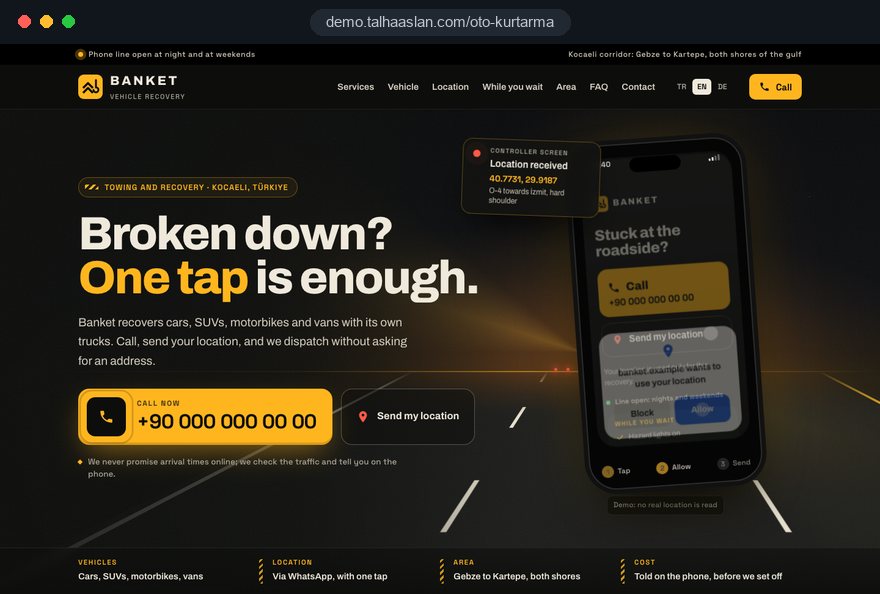
The number is below the fold
A large banner image, a slogan and a list of services push the phone number down the page. A driver on a dark hard shoulder will not scroll for it; they go back to the search results and call the next firm.

Your Windows contrast theme is on; colours come from your system.
Your device is set to reduce motion; animations are already off.
Your choices are saved in this browser only.
Industry-specific web design
Someone looking for a tow truck is usually on a hard shoulder or in a car park, with a low battery and no clear idea of exactly where they are. They will not read; they want to call, send their location and find out whether you can move their vehicle. We build towing and recovery websites around those three steps, with the call button on the first screen.
Open the live demoA demo design we built for a fictional brand
In short
A towing and vehicle recovery website lets a stranded driver call you with one tap, send their location in seconds and see at once which area and which vehicle types you cover. For recovery firms it should also explain plainly what drivers with breakdown cover or insurance assistance should do first. Accident recovery, vehicle transport and heavy recovery grow as separate pages.
Talha Aslan and teamLast updated:
Why it needs its own approach
Nobody opens a recovery website to browse. The visitor is stuck at the roadside and needs a screen that gets the call and the location in seconds, not a long company introduction.
A large banner image, a slogan and a list of services push the phone number down the page. A driver on a dark hard shoulder will not scroll for it; they go back to the search results and call the next firm.
Drivers rarely know which junction they are near or which carriageway they are on, and the Highway Code tells them to wait behind the barrier, away from the car. Describing a location in words takes minutes and risks sending the truck the wrong way.
The site names a county and nothing more. A driver on the motorway, on an industrial estate or just outside town cannot tell whether you will come, so they choose the firm that states its area clearly.
Motorbikes, vans, minibuses, lorries and plant machinery need different equipment. When the site does not say what you can lift, an HGV operator calls in vain and a car owner assumes you only recover lorries.
A driver with breakdown cover or insurance assistance does not know whether to call their provider first or call you directly. Left unexplained, this creates wrong expectations and muddles contracted jobs.
Stock photos say nothing about who will take the vehicle away. If your own recovery vehicles, equipment and company details are not shown, a driver handing their car to a stranger has little reason to trust you.
Sources: The Highway Code, rule 277: breakdowns on motorways, GOV.UK
Our approach
We do not build a recovery website like a company brochure; we build it around the first thirty seconds of someone who is stuck. The phone number is a large button on the first screen and stays fixed at the bottom on mobile. Next to it sits a location button: with the driver's permission it adds their coordinates to a ready WhatsApp message, so your controller can dispatch without asking for an address.
The coverage area appears on a map and on separate pages for towns and motorway sections, each linked to the recovery pages for different vehicle types. If you also repair the vehicles you recover, we grow that side separately with the garage website or accident repair website structure; this page focuses on the driver at the roadside.
Design, development and content sit in one team, so the call button, the location flow and tracking are not bolted on later; Talha Aslan sets the strategy and experienced team members carry out the work.
Home
Every page leads to the same call and location flow; recovery and area pages are found separately in search.
The right setup
All three come from the same foundation; the difference is your fleet and whether the work is urgent or planned.
Local
You cover a town or district with one or a few vehicles; drivers call the nearest truck.
Fleet
You handle accident, heavy and plant recovery; insurers, fleets and businesses are your customers too.
Planned
The customer is not in a hurry; they want a car moved to another city and compare quotes.
Built for towing and recovery
This list covers the decisions that matter most when presenting towing and roadside recovery work.
The number sits on the first screen and stays fixed at the bottom on mobile. Whether you work nights and weekends is stated plainly; the site makes no arrival time promise you cannot keep.
If the driver allows it in the browser, the location button adds coordinates and a map link to a ready WhatsApp message; if not, two short steps show how to share a live location instead. How location data is used is set out in the privacy notice.
A map, the towns you cover and the motorway and trunk road sections you reach. Each area page carries information specific to that area; we do not clone pages by swapping place names.
Which recovery vehicles and equipment you use for cars, motorbikes, vans, lorries and plant. We show your own fleet with real photos so the driver sees what will arrive.
Drivers with breakdown cover are told whether to call their provider first. Insurers or assistance providers you work for are named only if the arrangement is real and you have permission; we do not use their logos without it.
A short guide based on rule 277 of the Highway Code: on a motorway, leave the vehicle by the side away from traffic, get behind the barrier where there is one and do not attempt repairs. It helps the driver and shows that you take safety seriously.
Sources: The Highway Code, rule 277: if your vehicle breaks down on a motorway, GOV.UK
Comparison
| Topic | Generic company template | Site built for recovery work |
|---|---|---|
| Calling | Number on the contact page or in the footer | Fixed call button on the first screen and every page |
| Location | Driver describes the location by phone | Location sent in a WhatsApp message with one tap |
| Coverage area | Just a county name | Map with town and motorway pages |
| Vehicle types | A general list of services | Pages by vehicle type and equipment |
| Breakdown cover | Not mentioned | Provider route and contracted jobs explained |
| Tracking | Visitor numbers | Which page and area brought the call |
Quick check
Must haves: does your site have them?
0 of 6 in place Tick the boxes to see where your site stands.
Added as needed
We choose which of these you need together during the scoping call.
Share the area you cover, your recovery vehicles and your working hours; we will work out the right page structure and send a written quote.
Process
We define your business, your audience and the site’s one-sentence job: who it sells what to, through which action. Scope and timeline are written from that answer.
The home page and key templates come to you as designs first; no code is written before your approval. We do not like surprises, and we do not cause them.
The approved design becomes fast, secure, maintainable code. You follow progress in the CRM and see every page in a staging environment before launch.
The site goes live with analytics, Search Console and conversion tracking connected; panel training is given, first-year hosting and maintenance included.
Search and speed foundations
Drivers type 'tow truck' or 'vehicle recovery' with a town or motorway name, or check the map for the nearest firm. Area pages, recovery pages and your Google Business Profile are built to support each other.
Company name, phone, service area and opening hours are marked up so search engines can read them; nothing is marked up that is not on the page.
Mobile signal at the roadside is often poor. Pages are designed for phones first, the call button works before the page has fully loaded, and Core Web Vitals are measured before launch.
Calls, location sends and WhatsApp clicks are tracked as conversions from day one, so you see which area and which recovery page brings the calls.
Free tools
Before planning a new site, check the speed a driver sees on a phone, how you look in search and how one tap contact works; try coordinate formats with the converter and make a QR code for your trucks. The tools are free and need no sign up.
Tech SEO
Test whether a page works well on phones: viewport, font size, tap targets, a mobile screenshot and Core Web Vitals.
SEO
Test your title and meta description with pixel-based measurement, desktop + mobile view.
Tech SEO
Generate rich-result JSON-LD for Article, Product, FAQ, Local Business.
Conversion
Create a wa.me link with a preset message + embeddable button code.
Maps
Convert latitude and longitude between decimal degrees, DMS, DDM and UTM, and get the distance, bearing and midpoint between two points, with map links.
Conversion
Turn URLs, WhatsApp, Wi-Fi, vCard and text into a QR code in seconds; download high-res PNG or SVG.
How we work
We do not yet have a live client website in towing and vehicle recovery, so we show our approach on a live demo. The demo is not client work. You can see websites we have built in other industries on our references page.
Live demo
For this field we built a one page demo site for a fictional brand, made only to show our approach. You can explore the design, the copy structure and the mobile view live in three languages.
Open the live demoWe go through every step with your controller, from the moment a driver opens the site to the moment the vehicle is loaded, and build the call and location flow around it.
We agree which towns, motorway sections and hours you can cover, and build the map and area pages from that list.
We gather your recovery vehicles, what each one can carry, your company details and documents, and present them with real photos.
We follow which page and area bring calls and where visitors give up, and fix it in the first months.
Related pages
Industries
For garages that repair the vehicles you recover.
Industries
For body shops handling accident and insurance repairs.
Industries
For hire firms supplying replacement cars after a breakdown or accident.
 How to Do Google Maps SEO: A Guide to Ranking Your Business Higher on the MapRead article
 What Is Mobile First Design? How Mobile First Affects Your SEO RankingsRead article
 What Is a Call to Action (CTA)? CTA Button Examples That ConvertRead article
 How to Build Trust on Your Website: Trust Signals That Turn Visitors into CustomersRead article
FAQ
If your question is not here, write to us; we will send you an answer and a written quote.
Next step
In a free 15-minute call, in English, we will go through your area, your fleet and your call flow, then send a written scope and quote.
In-depth guide
A towing website is opened to get help, not to compare brochures. Most visitors arrive at the roadside, often at night, holding a phone in one hand; a smaller group are fleet managers looking for a recovery partner or private owners who want a car moved to another city next month. A good site serves all three without mixing them up.
The sections below follow the order in which we make decisions on a towing and recovery project: the first screen and location capture, then the work of your controller, coverage and vehicle types, trust, search visibility and measurement. Each one ends in something you can check on your current site this week.
On a phone, nothing on the first screen should compete with the call button. A large photo of a recovery truck, a rotating banner or a long slogan pushes the number down and sends the driver back to the search results. The call button belongs at the bottom of the screen, within easy reach of the thumb, in the same place on every page.
We order the first screen like this:
Be careful with arrival times. "With you in 15 minutes" turns into a one star review the first time traffic or a busy night makes it impossible. Saying that your controller will give an estimate based on the driver's location is honest, and it reads as more professional than a promise you cannot control.
A location button only helps if every possible outcome leads to a clear next step. The browser asks for permission; the driver may refuse, the signal may be weak, or the position may be hundreds of meters off. We decide what the screen says in each of these cases during design, not after launch.
The format matters to the person receiving it; decimal degrees and degrees, minutes and seconds look very different on a controller's screen, and you can compare them with your team in our coordinate converter. Location is personal data, so your privacy notice should state that it is collected only for the job, how long it is kept and who receives it. The button links to that statement with a short note rather than a long legal page.
The site's job does not end at the call button; an unanswered call loses the work the site has just won. In many recovery firms the only number rings on a driver's phone, and that driver cannot answer while winching a car onto a bed. Before building anything we establish where calls land and what happens when the line is busy.
We answer these questions with your controller:
We suggest testing the ready message in our WhatsApp link generator and checking how it looks on your controller's phone. Keep the blank lines short; asking a driver on a verge to fill in a form pushes them to call someone else. Once this flow is written down, every button on the site connects to the same operation.
In towing, coverage is defined by the road network more than by town or county lines. Drivers add a motorway number, a ring road or an industrial estate to "tow truck" as often as they add a town. So we plan area pages around the routes your trucks can genuinely reach, not around administrative boundaries.
An area page should contain:
You do not need a page for every town. Areas where you get work and have something original to say deserve a page; the rest are listed on the map and the main coverage page. Pages cloned by swapping place names do nothing in search and erode trust in the whole site.
A vehicle type page should answer one question at a glance: can this firm move my vehicle? A motorbike owner wants to know it will be strapped down without falling over, the owner of a lowered car worries about scraping on the ramp and an HGV operator wants your heavy recovery capacity. A generic list of services answers none of this.
On each page we explain which vehicle you send (flatbed, spec lift or heavy recovery unit), how the vehicle is secured and what you need to know in advance for special cases such as a loaded lorry or a trailer. Manufacturers of electric and hybrid cars may give their own towing instructions; the page can ask the driver to check the towing section of the owner's manual and mention it to the controller.
At the end of the page sits a short list of what the driver should pass on: make and model, whether the vehicle starts, whether it can be put in neutral and whether it carries a load. This helps the controller send the right truck the first time. Write separate pages for rare work such as plant machinery or coaches only if you genuinely do it; listing work you do not do brings wrong calls and wasted time.
A driver with breakdown cover or insurance assistance often does not know whom to call when they reach your site. The site should not make that choice for them; it should lay out both paths plainly and neutrally. Sending them the wrong way leads to arguments about who pays and strains your relationship with the providers you work for.
We use a short decision screen:
Name insurers or breakdown providers you work for only if your contract allows it and you have written permission; logos need their own consent. We place this content behind a short link under the call button and on a separate page, so an urgent driver is not slowed down on the first screen and a driver with a question finds the answer in two taps.
After the call, the driver spends the hardest minutes waiting, and often opens your site again. A short "while you wait" page meets that moment, helps the driver and shows that you take safety seriously. It should restate official guidance, not improvise.
In the UK, rule 277 of the Highway Code tells drivers who break down on a motorway to leave the vehicle by the side away from traffic, get behind the barrier where there is one and not attempt even simple repairs. We turn this into a few lines linked from the call screen, using the official wording and going no further. Add your own practical point at the end: when the truck arrives, check the driver's name and the vehicle against the details on your site.
Handover deserves its own explanation. A driver handing a car to a stranger wants to know:
Drivers who have read this ask fewer questions at the roadside, and loading finishes sooner. Handover photos and records also protect both sides if damage is disputed later.
Trust on a towing site comes from details a driver can verify, not from slogans. They are about to hand their vehicle over; they want to know the company is real, that the truck arriving is the one on the site and who they are dealing with. Stock photography answers none of those questions.
The company page should show your registered company name and number, your contact channels and real photos of your fleet. Photos that show your livery also help a driver recognize the right truck on a dark roadside. List the recovery vehicles by type with what each can carry, and say which areas each one usually covers.
Accreditations, trade association memberships and insurance should be explained, not just displayed. A driver does not recognize scheme names; a plain sentence such as "your vehicle is covered by our goods in transit insurance while on our truck" says more than a row of badges. Only list memberships you currently hold.
If you carry out removals for police, councils or private land owners, the rules differ by country and by contract, and the person whose car was removed needs very different information from a stranded driver. In that case we build a separate information page for them, with wording you have checked against your contract. If you do not do that work, remove any phrasing that suggests you do.
Emergency calls and business enquiries cannot share one screen. A fleet manager, a car dealer or a private owner sending a vehicle to another city is not in a hurry; they want a quote, compare terms and sometimes need a contract. Pushing them to the emergency number ties up your controller and makes your firm look disorganized to a business customer.
We build a separate section for business and planned work, answering what these customers want to know before asking for a quote:
The contact channel here is a form or e-mail, not the emergency line. That keeps business requests traceable and leaves the emergency number for stranded drivers. Success is measured differently too: not calls, but how many quote requests become agreements. So we limit the form fields to what your sales side genuinely needs to price a job.
Many stranded drivers see the map results before any website, so your Google Business Profile should be planned together with the towing site. Breaking the profile guidelines may bring short term visibility, but it puts the profile itself at risk.
Two points in Google's guidelines matter in particular for this trade. First, the business name must match your real world name; a firm whose signs say "Smith Recovery" and whose profile says "Smith Recovery Towing Tow Truck Open All Night" is adding keywords against the rules. Second, service area businesses that go to their customers can hide their address and define a service area instead, which suits most recovery firms without a public office.
We run these checks so the profile and the site confirm each other:
We plan how area pages, recovery pages and the profile support each other as part of our SEO service, including the tone of your replies to reviews. When asking for reviews, a short message with a review link after the vehicle is delivered is enough; replying briefly and personally to every review does more for the profile than any incentive.
Mobile signal at the roadside is often poor, so the call button has to work before the rest of the page has loaded. The number should sit in the page's basic HTML rather than waiting for a script. Heavy images, video backgrounds and slow chat widgets should not be on the first screen.
We measure speed with Google's Core Web Vitals. At the 75th percentile of visits, the values count as "good" when LCP, the time until the largest content element appears, is 2.5 seconds or less; INP, the delay before the page responds to a tap, is 200 milliseconds or less; and CLS, how much the layout shifts while loading, is 0.1 or less. A call button that jumps during loading makes drivers tap the wrong thing, which is why layout shift matters so much for a towing site.
Structured data needs the same care: company name, phone, service area and hours are marked up only if they appear on the page. You can check your current site with our mobile friendly test and your markup with the schema markup generator. Test font size and contrast on a real phone at low brightness, because many visitors read the site in the dark.
For a towing business, success is not measured in visits but in which page and which area bring calls. Call taps, location sends and WhatsApp clicks should be recorded as separate conversions from day one. Once you can see which area page leads to calls, decisions about where to invest stop being guesswork.
We split the data like this:
If you advertise, campaigns should be limited to your real hours and your real coverage area; ads shown at night when nobody can attend spend budget on calls you cannot take. We set up call focused campaigns with area and schedule settings as part of our Google Ads management. Where tracking relies on cookies, consent and a clear privacy notice are part of the setup, not an afterthought.
These mistakes look unrelated, but they end the same way: the driver leaves without calling, or calls with the wrong expectations. Each item includes the better alternative.
Testing your current site against this list on a phone, in the dark and on a weak connection is the cheapest audit you can run before planning a new one. Every problem you find becomes an item in the new site's scope.
The right partner treats a towing website as a tool that takes calls, not as a brochure. To find out how an agency approaches this, ask:
We answer these in writing at the start of a project. We do not yet have a live client site in towing and recovery, so we show our approach on the live demo linked on this page; the demo is not client work. You can see the overall scope of our web design service on its own page.
Cost depends on the number of area pages, the location flow, a business quote form and the number of languages. Current packages are in our web design pricing. Share your coverage area, your fleet and your hours through the contact form, and we will agree the scope with you and send a written quote.
Start a Project
Thanks {name}, we've received your brief. We usually reply within the same day.
What happens next?