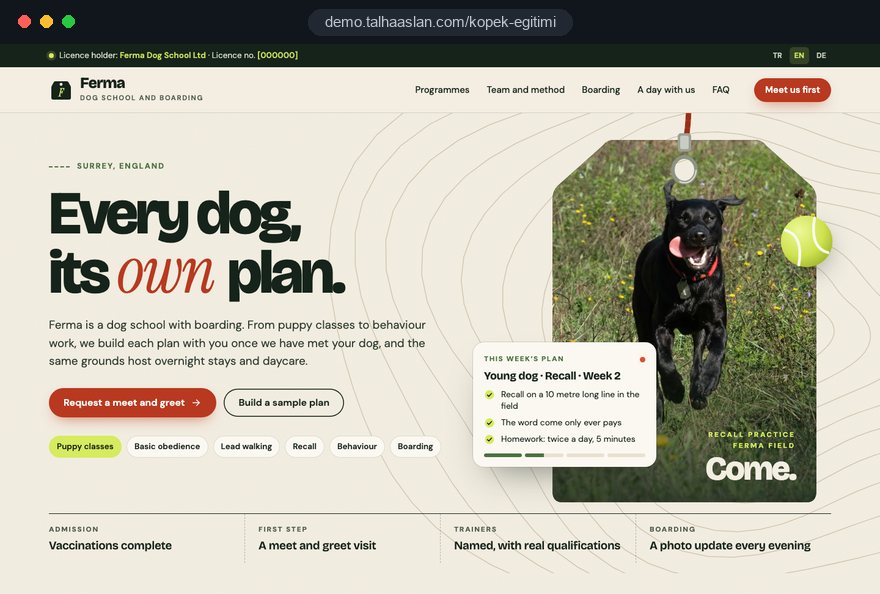
A dog training or boarding website is really a trust process turned into pages. The owner starts by putting a name to a problem, then wants to know who will work with their dog and how, and finally wants to picture the moment they hand the leash to a stranger at the door.
This guide walks through how we plan a dog training and boarding site in that order: which decision happens on which page, what the licensing rules put on the screen, how to handle the school holiday rush and which measurements actually matter. Every section ends in something you can check or change on your own site this week.
01Map the owner's decisions before the menu
Your sitemap should come from the order of questions in the owner's head, not from a list of your services. Someone looking for dog training or boarding usually compares several businesses in one evening and follows the same path on every site; the first place they get stuck is the point where they open the next tab.
We write that path as four decisions and attach each one to a group of pages:
- Fit: Which program matches my dog's situation? Program pages answer this.
- Trust: Who will handle my dog, and with what approach? Trainer profiles and a method page carry this decision.
- Admission: Will my dog be accepted, and what do I need to bring? The admission rules page says so before the form.
- Commitment: How do I take the first step? The meet and greet and inquiry flow close the loop.
The same order shapes the home page. A short program picker sits at the top, trainer faces come next, then a summary of admission rules, and the meet and greet call to action closes the page. To audit your current site, ask one question: can a new owner answer all four decisions without sending a message? If not, the missing page is usually the question that appears most often in your inbox.
02Name programs after the problem owners search for
Program names should match the words owners type, not your internal shorthand. "Foundation obedience" is a sensible program title, but owners search for "dog pulls on the leash", "puppy biting" or "dog barks at the door". The headline and opening paragraph of each program page need to connect those two vocabularies.
Using one skeleton for every program page makes comparison easy:
- Who it suits: Age range, type of problem and when you would recommend a different program instead.
- How sessions run: Group class or private session, at home or at your venue, and what happens in a typical session.
- What the owner does: The practice expected between sessions and why progress depends on it.
- What comes next: The program that naturally follows, plus the link to book a meet and greet.
The "who it is not for" line is the most valuable part of that skeleton. A puppy class page that says an adult dog reacting to other dogs belongs in a one to one behavior session, not in the group, prevents the wrong inquiry. As programs multiply, keep a single overview page with one sentence and one link per program so owners do not get lost.
03Introduce trainers and their method with evidence
A trainer page is not a résumé; it answers the question "would I trust this person with my dog". Owners compare trainers on what they can verify, so the strongest profiles stick to facts that can be checked.
For each trainer we ask for:
- Identity: Full name, a current photo and at least one picture of them working with a dog.
- Qualifications: Only courses, certificates and memberships actually held, written with their exact names and the issuing body.
- Focus: The programs they lead most often and the cases they refer to a vet or a behaviorist.
- Method: How a dog is rewarded during a session, which equipment is used and which is not.
Describe the method through concrete behavior rather than adjectives. "A gentle, loving approach" says nothing; "we use food rewards and play, and the first session is spent letting the dog settle into the room" gives the owner a scene they can picture. If you have several trainers, place a small card for the lead trainer on every program page, so owners see who they would work with without leaving the page.
When a trainer leaves, update their profile and every program card on the same day. An owner who meets a different person at the door from the one on the website starts the relationship with doubt.
04Put license details where the law expects them
If you board dogs in England, your license details belong on the website, not only on the wall of your reception. Under the Animal Welfare (Licensing of Activities Involving Animals) (England) Regulations 2018, boarding in kennels, home boarding and day care for dogs are licensable activities, and the license holder's name followed by the license number must be clearly and prominently displayed on any website used in connection with the activity.
We handle this with a simple routine:
- Confirm with you the exact license holder name and number as they appear on the license itself.
- Place them in a fixed area that appears on every page, typically the footer, so a redesign or a new landing page cannot drop them.
- Repeat them on the boarding and day care pages, next to the description of the service they cover.
- Note the license expiry date in your own calendar so the site is updated when the license is renewed.
Home boarders often run their business through social media alone; if you also have a website or a booking page, the same display duty applies to it. Rules differ in Scotland, Wales, Northern Ireland and outside the UK, so check with your local authority where you operate.
05Turn admission rules into a checklist before the form
Admission rules should be read before an owner reaches the inquiry form; a rule discovered at the door is a wasted morning for everyone. Your vaccination and parasite policy is a professional decision to agree with your vet, and the website's job is to state it clearly.
We build the checklist in this order:
- Age and vaccinations: The minimum age you accept and the vaccinations you require, with the proof you want to see.
- Parasite treatment: How recent flea, tick and worming treatment must be.
- Health and behavior: Medication, chronic conditions or reactivity that must be disclosed in advance.
- What to bring: Leash, food, any medication and, for boarding, a familiar blanket or toy.
- Confirmation: A checkbox on the form confirming the owner has read the list.
Keep the full list on its own page and repeat a short version at the bottom of every program and boarding page. Ask for vaccination status again in the inquiry form; when the checklist and the form reinforce each other, fewer dogs arrive without paperwork. Where a rule comes from your license conditions and another from your own preference, say which is which.
06Design the meet and greet as a three step journey
The meet and greet is the main conversion point of a dog training site, and it works better when owners can see what will happen. "Call us" is vague; "send your dog's details, visit with your dog, then choose a program or dates" is a plan.
We show it as three steps on the site: the inquiry form, the meeting at your venue or at the owner's home, and then confirmation of the program or stay. Collecting the right details in step one means the meeting is spent with the dog rather than on paperwork, and your handover records are mostly complete before the dog arrives.
A good inquiry form asks for these fields and nothing more:
- The dog: Name, breed or mix, age, neutered or not, approximate weight.
- Health: Vaccination and parasite status, medication, allergies.
- Behavior: Short multiple choice questions on how the dog behaves with other dogs, with strangers and when left alone.
- The request: The program or the boarding dates, and the preferred contact channel.
If your group classes run on a fixed timetable, an online booking calendar lets owners pick a slot themselves. If meetings depend on the trainer's assessment, a form is enough: the request reaches you by e-mail and WhatsApp, and you propose a time.
07Describe a day in your kennels hour by hour
On a boarding page, the most reassuring content is not a gallery but the shape of a normal day. An owner leaving a dog for the first time wonders where it will sleep, how often it goes out and who is there at night, and they want to see those answers laid out in time.
We build the "a day with us" section around your actual routine:
- Morning: First time out, feeding, and how food brought from home is handled.
- Daytime: Walks and play times, how dogs are grouped and where they rest.
- Evening and night: Last time out, sleeping areas and who is on site or how the night is covered.
- If something goes wrong: Which veterinary practice you work with and how the owner is contacted.
Write realistic time windows rather than exact minutes, and describe only the routine you genuinely follow.
If you run dog daycare, give it its own page, because daycare owners ask different questions: drop off and collection times, how dogs are kept busy and how tired they will be in the evening. Place photos inside this timeline rather than in a separate gallery; a picture of the sleeping area next to "night" and the garden next to "daytime" means far more than twenty images in a grid.
08Set clear limits on cameras, updates and photos
Camera access and daily updates should only appear on the site if you can deliver them every day. Owners choose you partly because of them, and a week of missed updates can turn a good stay into a complaint.
When writing this section, answer plainly: which areas the cameras show and during which hours, how access is given, how many times a day photos and notes are shared and through which channel, and how often training clients receive a progress note. Once this sits in fixed text on the site, the expectation between you and the owner is written down.
Sharing also has a personal data side. The inquiry form collects the owner's name, phone number and details about the dog, so a privacy notice must be linked next to the form, explaining what you collect, why and who sees it. For social media, ask for separate permissions in the form:
- May we post photos of your dog on our social media?
- May we mention your dog's name in posts?
- May we post handover photos in which you appear?
We recommend having the privacy notice reviewed by your legal adviser; our job is to make sure it is in the right place and easy to read on a phone.
09Prepare for school holidays and peak boarding weeks
Your busiest boarding weeks are predictable, and the site should be ready before they start. Around school holidays, summer and the end of the year, the same question arrives dozens of times: "do you have space between these dates?"
To let the website carry that load, we suggest these steps:
- State your peak periods and the booking deadline for each one at the top of the boarding page.
- Make arrival and departure dates required fields, so every inquiry arrives with dates.
- When you are full, turn the form into a waiting list rather than closing it, and say so clearly.
- For a busy season, publish a focused landing page without touching the main site, and point your social media links to it.
- Once the season ends, remove or update the page for next time.
If you offer a trial night, recommend it a few weeks before the peak; suggesting this on the site prepares both dog and owner for a longer stay and reduces last minute anxiety. The same logic works for training: when the start dates of the next puppy course are visible on the site, "when does it start" messages drop.
10Use training videos without slowing the page
Video shows your dog training method far more clearly than text, but loaded carelessly it makes the page heavy. Many owners arrive from Instagram on a phone with mobile data, and if the first screen loads slowly, they leave before the video plays.
We measure speed against Google's Core Web Vitals thresholds: LCP, which measures how long the main content takes to appear, should be 2.5 seconds or less; INP, which measures how quickly the page responds to a tap, 200 milliseconds or less; CLS, which measures how much content jumps around while loading, 0.1 or less. These are assessed at the 75th percentile of real visits.
To keep video within those limits:
- Load the video only when the owner presses play, with a light cover image on the first screen.
- Prefer short clips of a single exercise over long session recordings, so owners can repeat it at home.
- Write two or three sentences under each video; search engines understand the clip from that text.
- Point the link in your Instagram bio to the program page the post is about, not the home page.
You can see how your current site behaves on a phone in a few minutes with our mobile friendly test.
11Get found in local search for dog training
Most searches for dog training, boarding and daycare carry local intent; owners look for somewhere nearby and check the businesses on the map. Your Google Business Profile and your website need to confirm each other.
Google's guidelines are clear here: the business name must match the name you use in the real world, with no added keywords such as "dog boarding near me". Keywords stuffed into the name break the guidelines and bring no lasting benefit. Trainers who visit owners at home and do not receive customers at their own address can run as a service area business, hide the address and list the areas they cover.
Our local checklist:
- Consistency: Name, address and phone identical on the site, the profile and social media.
- Category: A primary category that reflects your main business, training or boarding.
- Linking: The profile links to the matching page, for example the kennel profile to the boarding page.
- Reviews: A review link sent after collection, and every review answered in the business's name.
With several sites, give each its own profile and its own location page; one page for two addresses leaves both owners and search engines unsure which venue is where. If you want to go further, our SEO service covers local search in depth.
12Measure which pages bring meet and greet requests
The point of measurement is not counting visits but seeing which program and which channel produce real meet and greet requests.
Before launch we define these events as conversions: inquiry form sent, phone number tapped, WhatsApp button clicked and boarding date form completed, each recorded with the page it came from. A WhatsApp button that opens with a prefilled message makes the first message more useful; you can build one with our WhatsApp link generator, with text that names the program, such as "I would like to hear about the puppy course".
Once a month, look at these questions:
- Which program page brings the most meet and greet requests, and which brings none?
- At which field do owners abandon the inquiry form?
- Which pages do visitors from Instagram stay on?
- When do boarding inquiries start to rise before each peak?
If visitors come from the European Economic Area, Google requires consent mode for its measurement and advertising features there, and in the EU consent is needed before non essential tracking. Check the cookie rules that apply where your visitors are, and keep the cookie notice and privacy notice linked in the footer.
13Common mistakes on dog training and boarding sites
Most mistakes in this field come from treating the website as a brochure rather than a decision tool. Each of these has a straightforward alternative:
- Promising fixed results: Replace "perfect recall in a week" with the stages of the program and the practice expected at home.
- Stock photos: Replace images of someone else's kennels with plain photos of your own space and your own trainers.
- Inflated credentials: Replace large logos of vague certificates with the qualifications actually held and the body that issued them.
- Missing license details: Replace a license number shown only at reception with a fixed place in the footer of every page.
- Inbox as the only channel: Replace scattered Instagram messages with an inquiry form that collects the dog's details, and point messages to it.
- Stale timetables: Replace last term's class dates with a named person who updates the timetable at the start of each term.
What these mistakes share is that the owner has to ask something the site should have answered. To test your own site, ask a friend to browse it as if they had never heard of you and write down every question that comes to mind. Fix whatever could cause harm if wrong, such as admission rules and contact details, before anything else.
14Choosing a team and your next step
When choosing who builds your dog training website, look at how many questions they ask about your business before you look at their design samples. A team that does not ask about your programs, admission rules and kennel routine in the first conversation will most likely hand you a generic template.
Ask every team you speak to:
- Who writes the program pages, and what information will you need from us?
- Through which channel, and with which details, will inquiries reach us?
- Where will license details, admission rules and the privacy notice sit on the site?
- What will you measure after launch, and how will you show us the results?
We put the answers to these questions into a written scope. We do not yet have a live client site in dog training or boarding, so we show our approach on the live demo linked on this page. Work for other sectors is on our references page, and our general way of working is described on the web design service page. Also agree who updates what after launch; timetables, trainers and admission rules change, and the site has to change with them.
Fixed scope packages are listed in the pricing section. To talk through your programs, capacity and admission rules, get in touch; after a short call we prepare a page structure and a written quote for your business.