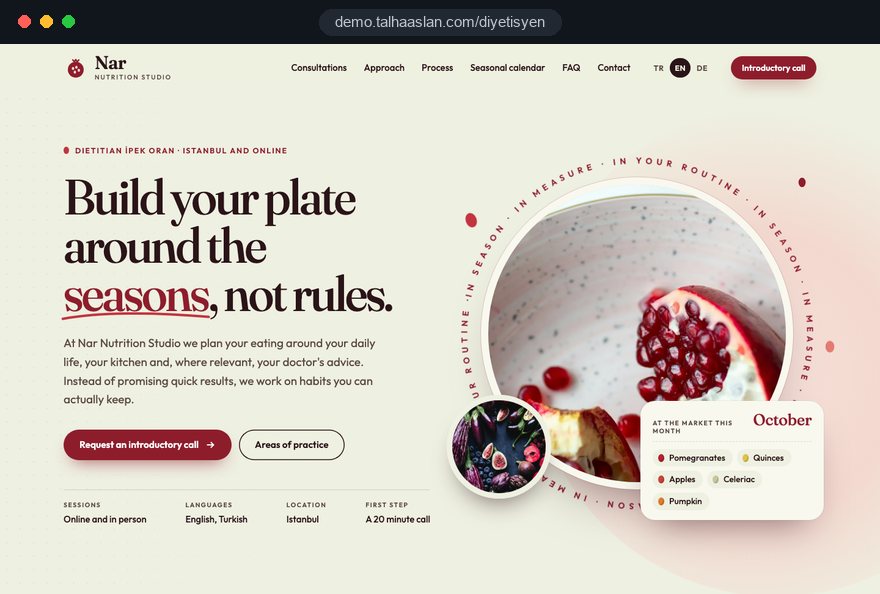
A dietitian website is not a longer version of your Instagram profile. A prospective client searches for a recipe, finds an answer to a question, checks your registration and approach, then chooses a package and shares health information with you. Each of those steps involves a decision, and most of them are content and data decisions that should be settled before anyone opens a design file.
The sections below follow the order in which a dietitian, nutritionist or clinic owner usually makes those decisions. Each one gives you something to apply to your own site: a checklist, a criterion, a worked example or a question to put to the team that will build it.
01Five decisions to make before design starts
The quality of a dietitian website depends less on colors and fonts than on five decisions made before work begins. When these stay vague, pages get rewritten halfway through, the intake form changes after launch and the schedule stretches.
- Title and scope: Write down how you describe yourself, which registration and qualifications you hold, and where your work stops and a doctor's starts.
- Client group: Decide whether weight management, sports nutrition, pregnancy or children's nutrition leads the site; a site that gives every topic equal weight speaks to nobody in particular.
- Consultation format: Online only, clinic only or both; your search strategy depends on the answer.
- Package structure: How many packages, how many sessions each, which channel follow up uses, and whether prices appear on the site.
- Content capacity: A realistic estimate of how many recipes or guides you can publish each month; the publishing plan is built on that number, not on ambition.
Putting these five answers on a single page and sharing it with your web team turns the first meeting from guesswork into a plan. The answers differ between a solo practitioner and a clinic with several dietitians, and the sitemap grows directly out of them.
02What the practitioner profile must show
The profile page is where a client tells a registered dietitian apart from a wellness coach, so it should rest on documents and be written in measured language. In the UK, dietitian is a protected title that only people registered with the HCPC may use; nutritionist is not one of the titles the HCPC protects. Whatever your title, the profile should state it exactly as it stands.
- Registration: Your title, the body you are registered with and your registration number where one exists, written so a client can check it.
- Training: Degree, university and any postgraduate focus; short course certificates belong under a separate heading, not mixed in with the degree.
- Scope: The client groups you work with and the situations in which you refer a client to their doctor.
- Approach: Three or four sentences on what happens in the first session and how you tailor and follow up a plan.
- Photo: A recent portrait in natural light; stock imagery quietly erodes trust.
In a clinic, every practitioner needs a profile of their own, linked to the practice areas they cover, so a reader on the pregnancy nutrition page reaches the right person in one tap. Avoid loose adjectives such as "expert" or "specialist" unless a document backs them up.
03Anatomy of a consultation package page
Each package page should answer enough questions that a client can decide without sending you a message. Giving every package its own page, instead of a short line under "Services", cuts the repetitive questions and makes comparison possible.
- Who it is for: The goal and client group the package was designed for, and who it does not suit.
- Scope: Number of sessions, approximate length of each, check in frequency and the channel used between sessions.
- Format: Online, in clinic or mixed, and the video platform used for online sessions.
- Terms: Rescheduling, cancellation and refund rules, and how long the package remains valid.
- Next step: One clear button to the intake form or the payment step.
Showing prices is a business decision. If you do, choosing a package can lead straight to checkout; if you do not, the page leads to the enquiry form and price is discussed in the first call. Either way the page must answer "Is this one right for me?"
A practical example: a page called "Sports nutrition, eight weeks of follow up" that describes someone with a training plan who wants eating matched to a competition calendar also filters out enquiries from people the package does not fit.
04Which questions belong on the intake form
The intake form should ask for the minimum needed to prepare the first session; detailed medical history belongs in the consultation itself. Under UK GDPR, information about someone's health is special category data, and the ICO expects a separate condition for processing it on top of a lawful basis, so every extra question is data you must justify, store and protect.
For each question, ask yourself: could I run the first session without this? If the answer is yes, the question goes. A form that passes that filter usually looks like this:
- Contact: Name, phone or email, and the preferred way to be contacted.
- Goal: The client's goal in their own words and the package they are interested in.
- Basic measurements: Height, weight and optional waist measurement, with a short note on how to measure at home.
- Session preference: Online or in clinic, plus suitable days and times.
- Consent: Confirmation that the privacy notice has been read, and a separate, unticked box for health data.
If you focus on one client group, the form can branch. A client choosing pregnancy support is asked which week of pregnancy they are in, an athlete is asked how often they train, and neither sees the other's questions. A separate, shorter check in form for weekly measurements saves clients from filling in the long form again every week.
05Where health data travels after the form is sent
Data protection is not finished when you add a privacy notice; you need to map where intake data goes, who sees it and how long it stays. The ICO's guidance on special category data is the reference point for UK practices, and similar principles apply under the GDPR in the EU.
Walk through the data flow with your web team using these questions:
- When the form is submitted, where is the content stored: in a protected admin area or in a plain email inbox?
- Who can open that admin area, with which login and from which devices, and in a clinic does each dietitian see only their own clients?
- Does any form content reach an advertising pixel, an analytics tool or a chat widget? It must not; only the fact that a form was sent should be measured.
- How long is the data kept after the programme ends, and who deletes it?
- How does a client ask for their data to be deleted, and who answers?
The privacy notice should sit right next to the form and open in one tap. Cookie consent is a separate matter: non essential tracking needs the visitor's choice first. Your adviser settles the legal wording; our job is to put it in the right place and make sure no data leaks out technically. The same discipline runs through our psychologist website work, if you want to see how a neighboring health field handles confidentiality.
06Writing health claims and choosing images carefully
Every sentence on a nutrition site is read as a health claim, so copy should inform rather than promise outcomes. Rules on weight loss claims, testimonials and transformation photos differ by profession and country, and client confidentiality applies everywhere, so the safest structure is one that never depends on a promise.
In practice, the tone that works on social media rarely transfers to the website as it is. A few rewrites:
- Process instead of promise: Replace "Lose eight kilos in a month" with "In the first month we meet weekly and track measurements together."
- Approach instead of gallery: Show your consultation room, measuring tools and example plates rather than transformation photos.
- Information instead of numbers: Replace testimonials quoting kilos lost with clear answers to the questions clients ask most.
- Conditions instead of certainty: Replace "Works for everyone" with sentences explaining that each plan is adjusted to the person.
Two habits help across all markets: show a "last reviewed" date and the reviewer's name on guides, and keep a short editorial note explaining that content is general information, not individual advice. Building both into the page template from day one is far easier than editing hundreds of pages later. For any borderline wording, make the final call with your professional body's guidance or a legal adviser; our part is to carry that decision into the structure of the site.
07Building a recipe page template
Recipes published one per page, on a consistent template, are useful to clients and easy for search engines to understand. Recipes kept inside one long blog post or written only on an image have little chance of being found in search.
A recipe page should contain these fields, in this order:
- A short title that names the dish and what it suits, followed by a two sentence introduction.
- Servings, preparation time and cooking time.
- Ingredients in grams or cup measures, matching what your audience uses.
- Numbered method steps, in sentences short enough to read on a phone.
- The eating pattern it fits and the practice area it relates to, with a link to that area.
Structured data matters here: it marks the page as a recipe, with its times and ingredients, in a form search engines can read. You can check existing markup with our structured data tool.
If you publish calorie information, keep the calculation method consistent; clients can estimate their daily needs with our calorie calculator, which you are free to link from recipe pages. One plain photo in natural light is enough; heavy filters inflate file size and hide what the dish really looks like.
08A guide content plan and internal linking
Guides earn their place when they answer the question someone searched for and then lead them to the matching practice area and package. Starting from the questions clients actually ask in first sessions makes writing easier and lines up with real searches.
A workable publishing plan comes together like this:
- List the questions clients have asked over the past three months and group similar ones.
- Match each group to a practice area; a pregnancy question links to the pregnancy nutrition page.
- Plan one or two guides per practice area each month and put them on a calendar.
- End every guide with a link to the matching practice area and a suitable package.
- Every quarter, check which guides bring visits and enquiries, and adjust the plan.
Links should run both ways. Each practice area page should list its latest guides and recipes, so someone on "Sports nutrition" sees relevant recipes, and someone reading a recipe sees the sports package. Where a guide touches a medical condition, saying clearly that readers should speak to their doctor fits the professional framework and builds trust. Turning these guides into lasting search traffic is something we can plan separately as part of our SEO service.
09Online sessions, booking and payment flow
The fewer and more predictable the steps between choosing a package and the first session, the less often clients put the decision off. Sending bank details, waiting for confirmation, agreeing a time by message and then sending a video link separately each leave a gap where people drop out.
For a dietitian working online, a typical flow looks like this:
- The client picks a package on its page and completes the intake form.
- They choose a session time from the calendar themselves.
- They pay online, with cancellation and refund terms shown at the payment step.
- An automatic confirmation sends the session time, the video link and instructions for measuring at home.
- A reminder goes out the day before; for later weeks, the short check in form is shared.
If clients should pick their own time, an online booking website carries this whole flow. If you also see clients in a clinic, separating online and in person slots in one calendar avoids double bookings. Agreeing on the payment provider and the wording of refund terms at the start saves rewriting pages after launch.
10Mobile speed for pages opened in the kitchen
Recipe pages are mostly opened on a phone, in the kitchen, often with one hand, so a dietitian website should be designed for the phone screen first and its speed measured before launch. Google assesses this experience with three Core Web Vitals.
- LCP: How long the largest element, usually the recipe photo, takes to load; 2.5 seconds or less counts as good.
- INP: How quickly the page responds to a tap; aim for 200 milliseconds or less.
- CLS: How much content shifts while the page loads; it should be 0.1 or less.
These thresholds should be met for at least 75 percent of visits. On nutrition sites, the usual culprits are oversized recipe photos, embedded social media feeds and several chat or tracking plugins running at once. Compressing images, showing a few chosen posts as static content instead of a live feed and removing plugins nobody uses are often the first and most effective steps.
A few kitchen details also matter: the ingredient list near the top of the screen, method steps in readable type and a page that does not jump as you scroll. You can see how your current site behaves on a phone in a few minutes with our mobile friendly test.
11Local search versus online practice visibility
Your search strategy depends on how you work: a dietitian seeing clients in a clinic should aim for local searches, while an online practice should aim for client group and question searches. Mixing both on the same page usually leaves you weak in each.
If you see clients in person, your Google Business Profile and contact page should support each other. The business name must match your real world name, with no keywords added such as "weight loss nutritionist"; Google's guidelines do not allow that. Address, phone and opening hours should read exactly the same on the site and the profile.
If you work online, client group pages make more sense than town pages:
- Group page: For example "Online nutrition support in pregnancy", covering the group's question and how sessions run.
- Question page: A guide that answers one question the group often asks, in depth.
- Process page: A step by step explanation of online sessions and measuring at home.
Page titles and descriptions should follow the same careful claims policy, because the line shown in search results is marketing copy too.
12Measuring which pages bring enquiries
Visitor numbers alone do not tell you whether a dietitian website works; you need to know which recipe, guide and package pages turn into enquiries. Set this up on day one, or the data from the first months after launch is lost for good.
Events worth tracking on a nutrition site:
- Form submission: Completion of the enquiry or intake form; only the fact it was sent, never its content.
- WhatsApp click: Which page the click came from.
- Payment: Which package was bought.
- Booking: A session time being chosen.
- Call tap: A tap on the phone number on mobile.
Once these are in place, a simple quarterly report is enough: the ten pages that bring the most enquiries, pages that are read but bring none, and where people leave package pages.
If a popular recipe page never produces an enquiry, for example, the link to its practice area may simply be hard to see. Analytics should run only after cookie consent where the law requires it, and form content must never reach these tools; with health data that point is not negotiable.
13Common mistakes on dietitian websites
Most mistakes we see on dietitian websites come from carrying social media habits onto the site, not from bad intentions. The six below, each with a sounder alternative, work as a checklist when you plan a new site or review an existing one.
- A transformation gallery: Instead of moving before and after photos onto the site, show your approach, your consultation setting and example plates.
- A long medical form: Instead of asking for full medical history up front, collect basic measurements and leave detail for the session.
- Forms landing in email: Instead of receiving health data in a plain inbox, store it in an admin area with restricted access.
- Every package on one page: Instead of a short list, give each package its own page with scope and terms.
- Recipes as images: Instead of writing a recipe inside a graphic, publish it as text with structured data.
- A vague title: Instead of general adjectives, list registration, qualifications and scope separately.
None of these needs a large budget; most are solved by making the right call once, during planning. If three or more apply to your current site, planning the structure again usually takes less effort than patching it.
14Choosing a web team and your next step
The right team for a dietitian website asks about your packages, your intake form and your claims policy before it talks about templates. If the first meeting is only about colors, the data and content flow that does the real work will be patched on later.
Questions to ask any team you are considering:
- Where will intake form content be stored, and how will it be kept away from analytics?
- Is there a dedicated recipe template with structured data?
- Do page templates include a "last reviewed" date and reviewer name?
- How will you report which pages bring enquiries after launch?
Coming prepared shortens the process: gather your package list with session counts, the questions you ask new clients today, the number of recipes you want to publish and your current site address if you have one. With these, scope, schedule and quote can be settled in one round.
We have no published client project in this field yet, so we show our approach on the live demo site linked on this page. You can see our work in other sectors among our client references and the whole process on our web design service page. When you are ready, share your packages and plans through the contact form and we will send a page structure and a written quote; fixed price options are in the pricing section.