The site talks to patients
Copy about smile makeovers speaks to patients, not to the dentists who actually send work. A dentist comparing labs wants materials, indications and turnaround, and leaves a site that reads like a consumer brochure.

Your Windows contrast theme is on; colours come from your system.
Your device is set to reduce motion; animations are already off.
Your choices are saved in this browser only.
Industry-specific web design
A dental lab's customer is the dentist, not the patient. When a dentist looks at a new lab, three questions come first: what you make, how they send you a scan and when the case comes back. We build dental laboratory websites around product pages, digital impression intake, case submission and documentation, for labs in the UK and elsewhere and for Turkish labs that serve dentists in Europe.
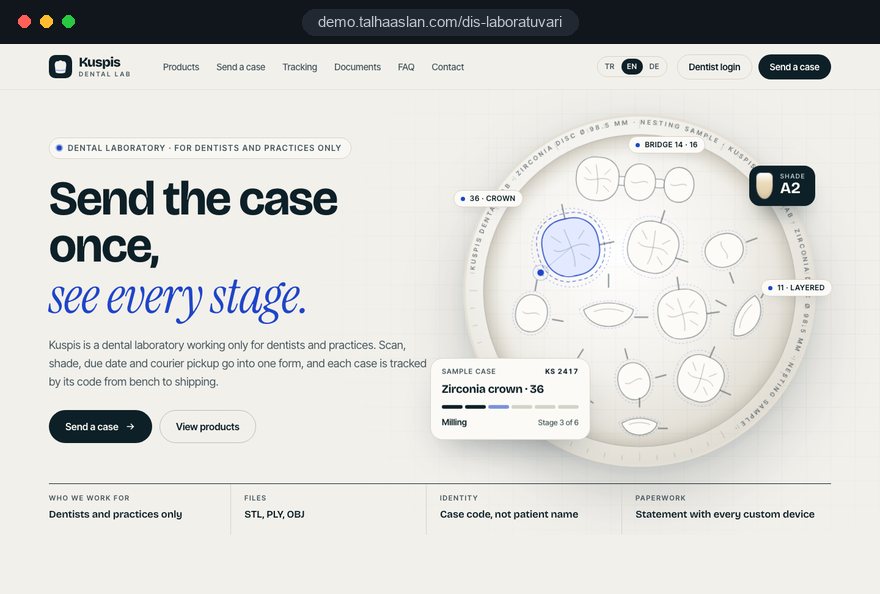
Open the live demoA demo design we built for a fictional brand
In short
A dental laboratory website tells dentists which restorations you make and in which materials, accepts intraoral scan files securely and gathers case submission and courier pickup into one flow. It is a B2B site: the reader is a clinician who decides on materials, turnaround times and paperwork. In Great Britain, custom-made dental appliances must be registered with the MHRA, so labs often show their registration and compliance details alongside the products.
Talha Aslan and teamLast updated:
Why it needs its own approach
A lab website is not a clinic website. The reader is a dentist, decisions are made on technical detail, and work flows in every day as files, impressions and courier runs. Generic templates do not know this workflow.
Copy about smile makeovers speaks to patients, not to the dentists who actually send work. A dentist comparing labs wants materials, indications and turnaround, and leaves a site that reads like a consumer brochure.
Zirconia, lithium disilicate, implant restorations and dentures share a single page with a line each. Dentists cannot see which implant systems you support or which material you use for which case, so they phone instead.
A dentist with an intraoral scanner does not know where to send the file. Scans end up scattered across email, messaging apps and file transfer links, and it becomes unclear which file belongs to which case.
Pickups, shade details and due dates are agreed by phone. A detail that is not written down means a remake, and the dentist still has to call to find out where the case is.
In Great Britain, custom-made devices must be registered with the MHRA before they are placed on the market, and only GDC registrants may call themselves dental technicians. If registration and documentation are missing from the site, dentists judge the lab on word of mouth alone.
Bold slogans and claims tell a clinician very little. Informative copy about products, materials and process builds more trust with dentists and keeps the lab clear of claims it cannot support.
Sources: GOV.UK: Register medical devices to place on the market (MHRA) · Regulated professions register: Dental technician (GDC)
Our approach
We build a lab website in the order dentists work: first they see what you make and in which material, then they learn how to send a scan or impression, and finally they submit the case and know when it will be back. Every product page ends in the same case submission flow.
If you serve dentists in several countries, product and document pages are set up with a multilingual structure; if dentists should log in to follow their cases, a member area is connected to the site. For labs that also mill for other labs, the job shop logic is covered on our CNC machine shop page.
Design, development and content sit in one team; Talha Aslan sets the strategy and our team handles delivery. Before launch we agree in writing where uploaded files are stored, who can see them and how long they are kept. We work remotely and in English with labs abroad.
Home
Each product page gives dentists the material detail they look for and leads into the same case submission flow.
The right setup
All three start from the same foundation; your workflow and where your dentists are make the difference.
Impressions and courier
Most work arrives as physical impressions by courier from local practices.
File based
Most work arrives as scan files, so speed and file security come first.
Dentists abroad
Dentists research from another country, so documents and process are explained in their language.
Built for dental labs
This list starts from the questions dentists ask when they consider a new lab.
For zirconia, lithium disilicate, metal ceramic, implant restorations and dentures: the material, where it is used, the implant systems you work with and what the dentist needs to send. Every page links to the same case form.
Supported file formats, compatible scanners, the file size limit and the details to include, all on one page. Uploads run over an encrypted connection, and because scans contain patient data, storage time and access rights are set from the start.
Dentist and practice details, product, shade, due date and courier pickup in one form, so nothing depends on a phone note and remakes caused by missing details become less likely.
Turnaround in working days per product, try-in stages and pickup times. Your lab sets the times; the table saves dentists a call for every case.
Material manufacturers' documents, a sample statement, MHRA registration and the GDC registration of your technicians where relevant. For devices placed on the EU market, Annex XIII of the EU Medical Device Regulation requires a statement for each custom-made device, kept for at least 10 years, or 15 years for implantable devices.
Optionally, a login where dentists see their cases, current stage and due dates. A case code can be used instead of the patient's name.
Sources: Regulation (EU) 2017/745, Annex XIII (as adopted) · GOV.UK: Register medical devices to place on the market (MHRA)
Comparison
| Topic | Generic business template | Site built for a dental lab |
|---|---|---|
| Audience | Cosmetic promises aimed at patients | Product and material detail aimed at dentists |
| Products | All restorations on one list | A material and indication page per product group |
| Digital impressions | An email address or a file transfer link | Encrypted upload with format and size guidance |
| Sending a case | A general contact form | Product, shade, due date and pickup in one form |
| Documents | A logo and a certificate image | Downloadable material documents and statements |
| Measurement | Visitor numbers | Which product page brings new dentists |
Quick check
Must haves: does your site have them?
0 of 6 in place Tick the boxes to see where your site stands.
Added as needed
We choose which of these you need together during the scoping call.
Share your products, the scanners you work with and where your dentists are; we will come back with a page structure and a written quote.
Process
We define your business, your audience and the site’s one-sentence job: who it sells what to, through which action. Scope and timeline are written from that answer.
The home page and key templates come to you as designs first; no code is written before your approval. We do not like surprises, and we do not cause them.
The approved design becomes fast, secure, maintainable code. You follow progress in the CRM and see every page in a staging environment before launch.
The site goes live with analytics, Search Console and conversion tracking connected; panel training is given, first-year hosting and maintenance included.
Search and speed foundations
Dentists do not only search for a dental lab; they search for a zirconia lab, an implant lab or a lab in their city. Each product page is built to answer its own search.
Lab name, address, phone and opening hours are marked up so search engines can read them; nothing is marked up that is not on the page.
Pages stay light and images are compressed; the area where large scan files are uploaded runs separately so it does not slow down the rest of the site.
Case submissions, file uploads and calls are tracked as conversions, so you can see which product page brings new dentists.
Free tools
Before planning a new site, check the speed of the current one, its secure connection and the authentication records of the emails you send to dentists. The tools are free and need no sign up.
Tech SEO
Scan any URL for title, meta description, headings, canonical, indexability and speed signals, and get an SEO score with a clear to-do list.
Tech SEO
Test whether a page works well on phones: viewport, font size, tap targets, a mobile screenshot and Core Web Vitals.
Security
Check an SSL certificate's validity, expiry date, issuer, hostname match, certificate chain and TLS versions in seconds.
Why do your emails land in spam? Check a domain's SPF, DKIM and DMARC records, find the errors and get a corrected record to copy.
Conversion
Turn URLs, WhatsApp, Wi-Fi, vCard and text into a QR code in seconds; download high-res PNG or SVG.
Conversion
Create a wa.me link with a preset message + embeddable button code.
How we work
We do not yet have a live client project for a dental laboratory, so we show our approach on a live demo site. The demo is not a client site. You can see our work in other industries on the references page.
Live demo
For this field we built a one page demo site for a fictional brand, made only to show our approach. You can explore the design, the copy structure and the mobile view live in three languages.
Open the live demoIn the first call we list your products, materials, supported implant systems and turnaround times together; the product pages grow out of that list.
Before launch we agree in writing where scan files are stored, who can see them and how long they are kept.
We ask the person who receives cases what they need from the dentist and build the form fields from that, with nothing extra.
We track which product page, which region and which channel brings new dentists, and fix abandoned forms and pages nobody reads.
Related pages
Industries
A separate structure for clinics that need patient facing treatment pages.
Industries
A file and confidentiality focused setup for machine shops that quote from drawings.
Solutions
Product and document pages per language for labs serving dentists abroad.
Solutions
For a login where dentists follow their cases.
 How to Build a B2B Website: Site Structure That Generates Qualified LeadsRead article
 Lead Form Design for Booking, Quote and Demo Requests: UX Rules That Lift ConversionsRead article
 Website Data Security for Business Sites: Encryption and Secure Data Handling GuideRead article
 How to Build a GDPR and KVKK Compliant Website: A Business GuideRead article
FAQ
If your question is not here, write to us; we will send you an answer and a written quote.
Next step
In a free 15-minute call, in English, we will go through your products, your digital workflow and the dentists you serve, then send a written scope and quote.
In-depth guide
Dentists rarely switch labs in one move. They send a single crown, check the fit, the shade and the date it came back, and only then trust you with bridges and implant work. A dental lab website exists to make that first case easy: a dentist should understand what you make, how to send the scan and when the work will return without picking up the phone.
This guide follows the order in which a dentist decides: product catalog, implant compatibility, scan intake, the case form, turnaround, remake terms, regulation, documentation, a dentist portal, search and measurement. Each section ends in something a lab owner can decide or fix this month.
A dentist looking at your site is asking one question: how low is the risk of trying this lab with one case. Most have had a problem with their current lab, such as a remake, a late case or a shade mismatch, and they look for evidence that the same thing will not happen again.
That is why the first screen of the home page belongs to decision information, not a slogan. Within the first ten seconds a dentist should see:
If those five items are missing, the dentist will most likely move on to a lab whose site answers them. The home page copy can stay short; the detail belongs on product pages.
Product pages work harder when they follow the clinical situation rather than the material list. A dentist thinks "single anterior crown" or "long posterior bridge" before thinking "zirconia", and the page should meet that thought.
Keep the same order on every product page, so a dentist who learns it once can find their way through the whole catalog:
The second point is missing from most lab sites, yet it builds the most trust. A page that says "in this situation we would suggest an alternative to monolithic zirconia" shows that technical judgment sits with you. Photos on these pages should show craftsmanship: a crown on the model, a cross section, surface texture. Work photographed on a model, rather than in a patient's mouth, informs a clinician better and keeps the whole site pitched at professionals.
For any dental lab that restores implants, the list of supported implant systems is one of the most visited pages. A dentist who cannot find their system tends to try the next search result rather than call you.
Build this page as a compatibility table, not as a wall of brand logos. For each system, give in one row:
Add a short note under the table: "If your system is not listed, write to us before sending the case." An outdated list creates the wrong expectations, so show a last updated date and decide in advance who keeps it current. The page also earns its place in search, because dentists combine the system name with "lab" when they look for a new partner.
A digital impression page should be more than an upload box; it should tell the dentist, step by step, how to get a file from their intraoral scanner to your lab. Some scanners send to labs through their own cloud platform, others work from an exported file.
Split the page into short sections by scanner brand. In each one state your lab's name or ID on that platform, the export formats you accept (such as STL or PLY), the details that must accompany the file and a file size limit. A dental assistant should be able to open the page and send the right file at the first attempt. Add a brief section on common scan problems too: margins that are not clearly captured, a missing opposing arch, no bite registration.
If you build an upload area on the site itself, these are the technical decisions:
For those confirmations to reach a dentist's inbox instead of the spam folder, check your domain's authentication records with our SPF, DKIM and DMARC checker.
The case submission form is your lab prescription in digital form, so its fields should be set by the technician who receives the work, not by a marketer. One missing detail means a call to the practice, a case on hold or a remake.
We suggest building the form in this order:
Every extra field lowers completion, so add nothing the technician does not use. When a returning dentist's practice details are remembered, the second and every later case takes seconds.
A turnaround page should give a dentist what they need to book the patient's next appointment; phrases such as "as fast as possible" do not do that. The dentist wants to know how many working days after the case arrives they will receive a try in or the finished work.
Build the table per product, in working days, with stages. For dentures, for example, custom tray, bite block, wax try in and finish can each have their own row. Also state when the clock starts: when the scan is approved or when the physical impression arrives.
Only your lab sets these times; the site describes how you work, not a promise. Filling the table with times you can keep starts a far sounder relationship than ambitious times followed by apologies. If you accept rush cases, give them their own row, with the products and conditions where they are possible.
Fit problems, and how a lab handles them, are among the most common reasons dentists change labs. A written remake policy on the site removes one of the biggest hurdles to sending a first case, and most dental lab sites do not have one.
The page should answer: when an adjustment is free, when a remake is made, what information and photos you need from the dentist, how long a remake takes and how a shade mismatch is handled. Explain the division of responsibility calmly; a problem caused by the impression or scan is handled differently from a problem that started in the lab.
Points to keep in mind while writing it:
Writing this down openly shows that the lab stands behind its work and answers, before the first call, most of the questions a new dentist would otherwise ask.
The rules depend on where you make and supply devices, and they affect the site directly. Three markets come up most often when a dental lab plans its site:
Even where patient contact is not banned, the commercial logic is the same: your customer is the dentist. In practice we write every page for clinicians, keep the case form for practices, avoid live chat that invites patients, and add a short note for patients who land on the site by accident asking them to speak to their dentist. Scans carry health data, so your privacy notice must explain how they are processed. We build the site inside these lines; final legal judgment on your obligations stays with your lab and its advisers.
The documentation section answers the dentist's question "where does this material come from, and is this case on record". For labs supplying practices in another country, this section often decides whether the conversation continues at all.
Show the registrations that apply to you, such as MHRA registration in Great Britain and the GDC registration of your technicians where relevant. Explain that the custom made device statement travels with every case, and show a sample. That settles one of the most frequent questions from a new client before it is asked.
When you organize the section:
Publish documents as downloadable, searchable files rather than heavy images. That keeps the page fast and lets a dentist find a material name with a quick search. If you serve dentists in several countries, the section should exist in each dentist's language, because a compliance document they cannot read does little to reassure them.
For a dentist who sends work every week, the most valuable feature is seeing where a case stands without calling. A dentist portal serves that need, but not every lab needs one on day one; first look at where your workflow actually gets stuck.
Decide with a few questions: how many "where is my case" calls arrive each day, how many dentists send more than one case a week, whether you already run case management software and whether it allows outside connections. The answers tell you whether to start with simple status e-mails or a full member area where dentists log in. Even without a portal, a short automatic e-mail at each stage change can remove a large share of those calls.
If you build a portal, settle these points in writing before launch:
The login page and the whole site must run over a secure connection; check your current certificate in a few seconds with our SSL checker.
Dentists usually search with a product, an implant system or a city: "zirconia crown lab", or an implant brand with "dental lab", carries a clearer intent than a generic search. Each product page and the compatibility page should be built to answer its own query.
What we prioritize on the search side:
If you supply dentists in several countries, product and document pages need separate pages per language; a translation plugin on a single page will not rank or reassure. We describe our approach to search in more detail on our SEO service page.
A dental lab website is judged by first cases from new dentists, and by whether those dentists send a second case, not by visitor numbers. If traffic rises while no new dentists arrive, the problem usually sits in the product pages or the form.
We set up conversions for completed case forms, scan uploads, courier requests, clicks on the phone number and document downloads, each recorded with the page it came from. That shows which product page, which city and which search term brings new dentists.
Decide before launch where cookie consent is required for analytics; in the EU, non essential tracking needs consent first, and other markets have their own rules. Reading the monthly report together with the person who receives cases is a practical way to match the numbers with real work.
Most mistakes we see on lab sites come from building for a patient or a general visitor instead of a dentist. These six are the most frequent, each with the better alternative:
Most of these need no new software. Reordering the site around how a dentist decides, and involving the person who receives cases, fixes most of them. Start with the issue that costs your team the most phone time.
The team that builds your dental lab website should want to understand your workflow first. If the first meeting is about your products, scanner compatibility and where your dentists are, rather than about design samples, you are on the right track.
Questions to ask any agency that quotes for the work:
We build dental lab sites as part of our web design service, with design, development and content in one team. We have no live client project in this field yet, so we show our approach on a live demo site linked on this page; work in other sectors is in our portfolio.
Fixed scope packages are listed in our pricing section. For a scope built around your lab, prepare your product list, the scanners you work with and the cities or countries your dentists are in, then write to us through the contact form; we will reply with a written scope and quote.
Start a Project
Thanks {name}, we've received your brief. We usually reply within the same day.
What happens next?